
Hostinger vs Bluehost in 2026: Which is Better?

Anyone who wants to launch a website, most of the time hears only two names: Hostinger and BlueHost.
Both of them are popular website hosting providers having millions of clients all across the globe. But, which one to go with? Hostinger vs Bluehost: which hosting provider is better in 2026? Who to trust? I am going to cover all that in this guide.
I’ll compare them from scratch, based on what they are, what services they offer, what they claim and if they really stand by it, we’re gonna find out.
I have also tested Hostinger’s and BlueHost’s servers personally for approx 30+ months and have arrived at a proper conclusion to help you understand which one, BlueHost or Hostinger, is the best.
Let’s get started right away!
Hostinger vs Bluehost: Quick Comparison
I know that you would like to have a quick precap aborecaptinger and BlueHost before we actually start comparing in detail.
Below, I’ve listed a long table that’s gonna help you understand where both of them stand based on the pricing, who it is best for, uptime, security, data centers locations, support channels and all.
This table above compares two of the most popular web hosting companies in the world: Hostinger and Bluehost.
As we see from the table, both offer affordable, beginner-friendly hosting, but they have very different hosting features. I’ll make sure to cover everything in detail: pricing, features, server quality, support, UI and company background.
I’ve written everything in really very simple, easy-to-understand language so anyone can decide which one is best for them.
Overview of Hostinger
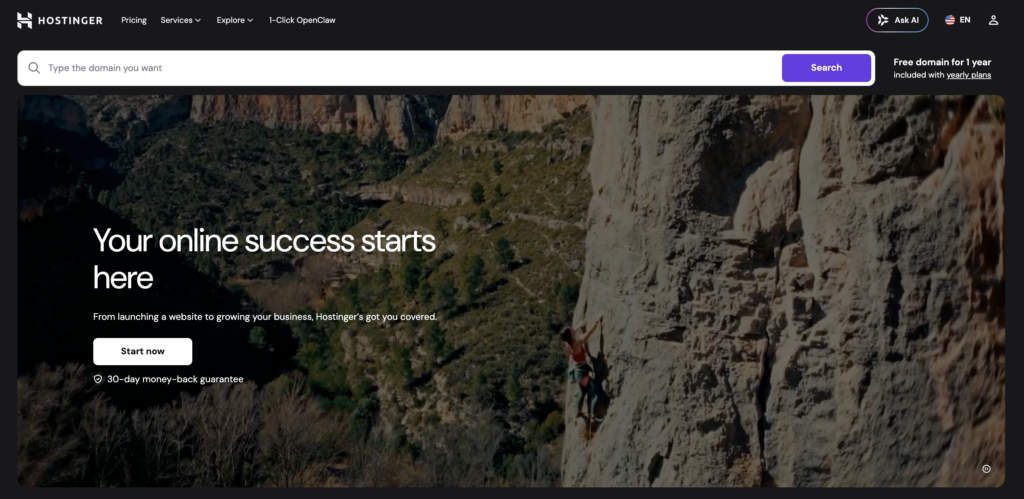
Before writing about Hostinger, let me tell you how I gathered information about Hostinger. I visited the official website of www.hostinger.com and took down every minute detail that could be relevant from the point of view of this guide.
As per my research, Hostinger is a Lithuanian web hosting company that started its journey in 2004 under the name: Hosting Media. It was then renamed as Hostinger in 2011. Since then, it has grown into one of the fastest-growing web hosting companies in the world.
Today, it works in 150+ countries and is especially popular in India and the US.
I even had a talk with one of Hostinger’s employees over a phone call.
He told me that Hostinger simply wants to make digital presence easier for everyone. Their mission is to offer affordable and AI-powered hosting so that anyone can build a website.
Exclusive: Hostinger has recently launched Hostinger Horizons (AI vibe coding) and due to this development, it has crossed 4.6 million clients.
Key Features
I completely understand that just by knowing when it was established and who established it doesn’t help you know about it in detail. That’s why I’ve also noted down each and every feature it offers to the client.
Along with the features, I’ve also mentioned how the feature is useful and who can use this feature:
- Hostinger Horizons: This feature is my favourite! It is an AI-powered vibe coding tool to build websites and apps by just describing what you want (And to do all that, you do not need to know coding at all).
- hPanel: It is Hostinger’s own custom control panel (Control panel is like an application with a simple graphical interface that allows you to handle your hosting account, make changes in your web files, add or remove subdomains). It is clean, modern and very easy to navigate for beginners.
- AI Website Builder: Using this tool, you can build a full website in under 60 seconds. What you need to do is that you need to answer just questions and AI creates the design of your website for you. It is easy to use and also doesn’t require any technical knowledge at all.
- Free Business Email: Get a professional business email free for one year on most Hostinger plans, helping you build credibility, communicate with clients efficiently. You can even keep your brand identity consistent from day one.
- Hostinger Reach (AI Email Marketing): Hostinger Reach is an AI-powered email marketing tool built to simplify campaigns and boost engagement. As per my research, it has already gained traction among 150,000 users this 2026.
- WordPress Auto-Maintenance: With automatic WordPress maintenance on Premium and higher plans, Hostinger handles updates, security patches and performance checks. This way you can focus on content and growth instead of monitoring tasks.
- LiteSpeed Web Server: Hostinger uses LiteSpeed Web Server combined with HTTP/3 and advanced caching technologies. This tech stack delivers faster load times and better handling of high traffic as compared to traditional server setups.
- Node.js App Hosting: On Business and higher plans, I’ve seen that Hostinger allows you to deploy and run modern Node.js apps. It makes it suitable for developers who are building scalable and high-performance web applications with ease.
- Kodee AI Agent: This is really amazing! Kodee is Hostinger’s built-in AI assistant that helps you with everything! It helps you set up hosting, troubleshoot issues and manage your website. You can take it as a smart guide throughout your entire hosting journey.
- Agency Hosting (Hostinger Pro): It is built for agencies to help them manage multiple sites and even collaborate tools and streamline workflow. This really makes it easy to handle multiple projects and deliver professional services at scale.
- OpenClaw Hosting: OpenClaw Hosting has a feature of one-click deployment of AI agents. This is really useful for the developers. It quickly lets them launch intelligent automation tools and this way they can save a lot of time and simplify advanced AI integrations.
- Self-hosted n8n: Creating AI agents and automating workflow is a common task these days. That’s why, I’ve also checked if it supports n8n hosting or not and it does. This type of hosting gives you full control over automation workflows and tool integrations.
- Minecraft Hosting: It offers VPS-based Minecraft hosting (no dedicated server). This VPS plan ensures a smooth gameplay and high performance. You can create and manage your own private game servers with ease.
I know it is a very long list, but you should know about all the features before you actually buy the hosting services from Hostinger.
Overview of Bluehost
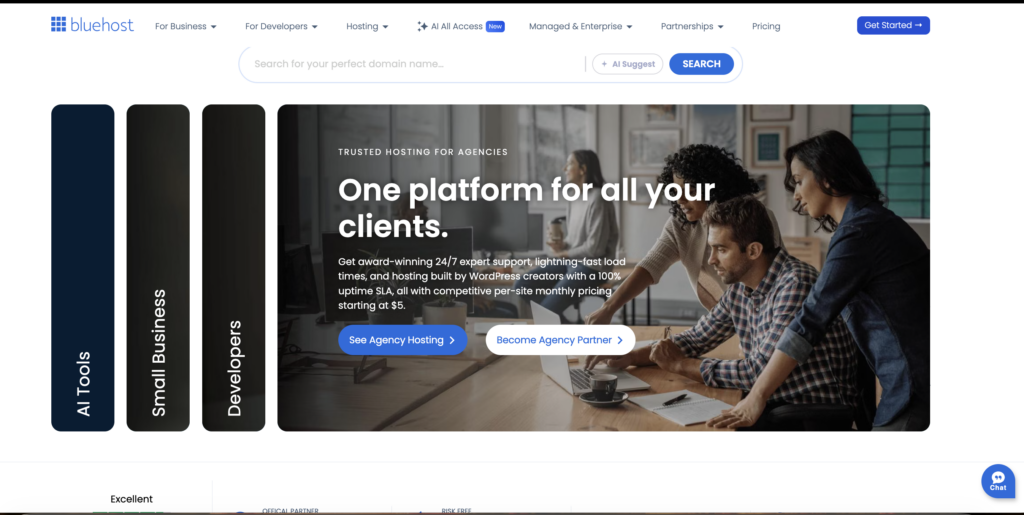
Now, after Hostinger, let’s see all about BlueHost. I have given below everything like when was it established, who established it, its mission and what its features are.
This way you can know all about BlueHost and then you can easily compare them well.
To write about BlueHost, I did the same thing as I did when I was researching Hostinger. I visited the official website of www.bluehost.com and noted down everything about them exactly so that nothing looks fabricated.
Bluehost is an American web hosting company founded in 2003 by Matt Heaton. It is one of the oldest and most trusted names in web hosting, especially known for its long relationship with WordPress.org.
And One more thing: BlueHost is One Year Older to Hostinger
Since 2005, Bluehost has been the officially recommended hosting provider by WordPress.org, making it the go-to choice for millions of WordPress website owners globally.
Today, in 2026, Bluehost is owned by Newfold Digital (formerly Endurance International Group), which also owns other brands like HostGator and web.com.
Now since I’ve mentioned about the mission of Hostinger, I’ve also talked about what BlueHost aims at.
BlueHost wants to help anyone build and run online. Their mission is to be the most trusted hosting partner for WordPress websites, combining infrastructure and AI-powered tools to make the web accessible to all.
Exclusive: BlueHost has recently in 2025, migrated its VPS and Dedicated servers to Oracle Cloud. It has reported better performance since then. And also in 2025, BlueHost has launched Agent Hosting for AI apps.
Key Features
I’ve also listed the features that BlueHost offers its users. This way you can get a proper idea about it and you can make your decision well. While listing the key features, I’ve 100% been unbiased and have not favoured any side at all. What’s written below is straightly coming from what their site provides.
Plus, I’ve also tested the features myself personally so that I can bring the true picture in front of you and help you get the best for your online presence.
- WordPress.org Recommended: Officially recommended by WordPress since 2005, Bluehost supports core contributions. This even ensures seamless compatibility and trusted performance. Really very good for beginners & bloggers, building WordPress websites.
- WonderSuite: WonderSuite of BlueHost provides an AI guided onboarding experience that simplifies website creation, generating layouts, content suggestions and customization options. This helps users launch professional WordPress sites quickly.
- cPanel Control Panel: It offers a simple interface that helps in managing domains, web files, databases, emails, security, setting properly and it even makes server administration accessible for developers and agencies as well.
- WordPress Staging Sites: WordPress staging sites let users clone websites into a safe testing environment. It helps the developers experiment with themes, plugins and updates before deployment/ This in turn prevents errors to visitors.
- Oracle Cloud Infrastructure: Bluehost VPS and dedicated hosting uses Oracle Cloud Infrastructure. This move is really great as after this move it has delivered improved speed through advanced networking and optimized resources.
- WooCommerce Hosting: This hosting plans include plugins such as subscriptions, memberships, bookings and affiliate tools. These plugins help businesses build powerful online stores with advanced features.
- Dedicated Hosting: BlueHost offers dedicated hosting (Hostinger doesn’t offer it) provides Bare metal servers. It offers maximum performance and enhanced security, making it suitable for high traffic websites.
- Agency & Enterprise Plans: Agency and enterprise plans offer scalable solutions with volume pricing and dedicated support teams. It helps agencies manage multiple projects, streamline workflows and deliver consistent results to clients.
- Yoast SEO Plugin: This plugin with WordPress plans optimize content, improve search engine rankings, generate XML sitemaps, manage metadata and provide actionable recommendations. This makes your SEO management easy.
- Agent Hosting: It enables deployment of AI applications like n8n, GatorClaw and OpenClaw. These AI apps support the developers and help them build innovative tools and intelligent systems directly on hosting infrastructure.
- Professional Design Services: This feature provides help in creating appealing websites, including branding and marketing integration. This service of BlueHost is really good for businesses who want to attract customers.
- Google Workspace Integration: Integration of google workspace connects email, documents, calendars and collaboration tools with hosting. It is good for seamless communication, productivity and team coordination, while using Google’s AI powered system.
I know the list is pretty long. But I have done so, so that nothing is left behind and you get a complete idea about BlueHost.
Pricing Comparison
We have a habit of checking out the price of anything we want to purchase. Believe it or not, price is one of the most important factors of making a choice. Below, I’m going to tell you about the starting price of all the hosting services offered by BlueHost and Hostinger.
I’m also going to tell you for whom a particular type of hosting is the best and what he or she’s gonna get if they plan to purchase it. After the pricing comparison of Hostinger and BlueHost, I’ll also tell you my point of view on it.
Hostinger Pricing
When I visited the official website of Hostinger and saw its pricing, they were all promotional rates. Means that if you’re a new user, which means first client of Hostinger, you’re gonna get a heavily discounted price during the first checkout.
The billing period is available for 1month, 12months, 36months & 48months. If you choose a higher billing plan, you get a high discount.
Please note: The renewal rates are higher.
This table provides the information about the hostinger pricing plans and what you get (what basic features and the discount you get) in the plan. Make sure to go with the higher plan to save more.
There is one more plan that Hostinger offers to its Indian users. It is much more affordable as compared to the rest of the plans. Starts @ ₹69 per month (somewhere around $0.72 per month).
This starter plan has every basic thing a newbie requires to start a blogging website.
Bluehost Pricing
Now, let’s see the pricing of BlueHost. I visited the official website of BlueHost and in their pricing page I got to find attractive discount rates.
The renewal rates are higher than the promotional prices.
In order to save more, try to go with the higher plan. This way you can avail the discount and even get a free domain for one year.
Below, I’ve made a table to help you see the hosting prices of BlueHost in just one glance.
Please note: BlueHost offers free LiveChat and Ticket support (responsive and friendly) in all the plans. The plan also offers free weekly backups. You even get free SSL certificate and DDoS protection in-built in all your plans. You do not have to pay anything extra for it.
Now, you’ve seen plans & pricing of both the web hosting providers. Let’s compare their prices and see which one fits the best for which user.
Which is More Affordable?
When you look at pricing, the difference between Hostinger and Bluehost shows up almost immediately.
Hostinger feels like a budget-friendly option that still gets the job done really well, especially for beginners or growing websites.
- Hostinger’s starting price ($0.72 or ₹69 per month for Indian users) is incredibly low, which makes it super attractive for anyone just getting started.
- Bluehost, on the other hand, comes in at a higher price, but it also has extra features to offer like phone support (Hostinger doesn’t offer phone support), staging environments and domain privacy in higher plans.
So while you pay more, you do get a few added comforts.
Now here’s where things get interesting.
Both providers love to pull you in with discounted starting prices (price for the new customers only), but the renewal rates are very high. Bluehost tends to increase prices more aggressively, sometimes going 3x times higher than what you initially paid.
Hostinger handles this a bit better by being more transparent about renewal costs upfront, which helps you plan ahead. Plus, Hostinger offers longer billing cycles, up to 48 months, letting you lock in those lower rates for a longer time, while Bluehost limits that to 36 months.
For users in India, this gap becomes even more noticeable.
Hostinger’s entry plan is extremely affordable, while Bluehost’s cheapest plans can be several times more expensive in comparison. Bluehost does bring something extra to the table with dedicated server hosting, which Hostinger currently doesn’t offer.
Performance Comparison
Performance is the single most important factor in web hosting. A slow site loses visitors, ranks lower on Google, and costs you money.
Here is how Hostinger and Bluehost actually perform when put to the test. Below, is a proper comparison of the performance of these two web hosting providers.
Performance covers four key areas: Speed Tests (how fast pages load), Server Response Time (TTFB), Uptime Reliability (how often the server stays online) and the Server Technology used (LiteSpeed vs Apache).
All numbers below are drawn from my personal testing by multiple third-party sources conducted in 2026. Where different test results differ, both are shown so you can see the full picture.
Speed Tests
Multiple independent tests conducted in 2026 show mixed results, and it is worth understanding why.
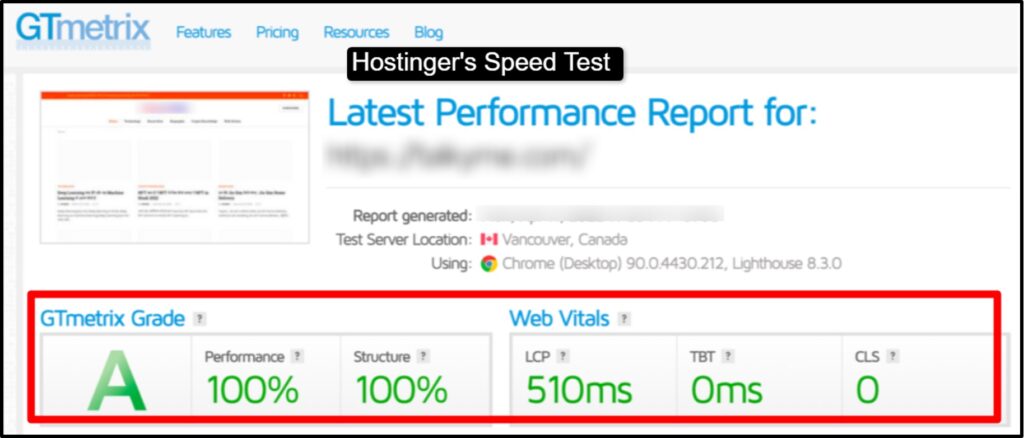
Hostinger’s LiteSpeed servers deliver faster average global response times. The above screenshot shows you the recent testing that was done by me. As you can see the speed of Hostinger’s server is 510ms.
In 3rd party testing conducted by Cybernews (2026), Hostinger recorded an average response time of 246 ms against Bluehost’s significantly slower results in the same test window. In a separate two-month test by Adwaitx, Hostinger averaged 35 ms response time while Bluehost averaged 144 ms, roughly four times slower.
Bluehost, however, showed a better Speed Index in some North American tests. WPShout’s November 2025 test recorded Bluehost loading in just 0.35 seconds for US visitors.
HostAdvice’s 2026 testing gave Bluehost a speed index of 1.1 seconds against Hostinger’s 1.3 seconds on that same metric.
So, as per the testing and 3rd party testing results, it is confirmed that Hostinger is faster globally, especially for visitors in Asia, Europe, and South America. Bluehost performs better for US-based audiences, thanks to its Oracle Cloud infrastructure.
Server Response Time
Time to First Byte (TTFB) measures how quickly your server responds after a browser sends a request. It is a direct indicator of server quality and is one of Google’s Core Web Vitals inputs.
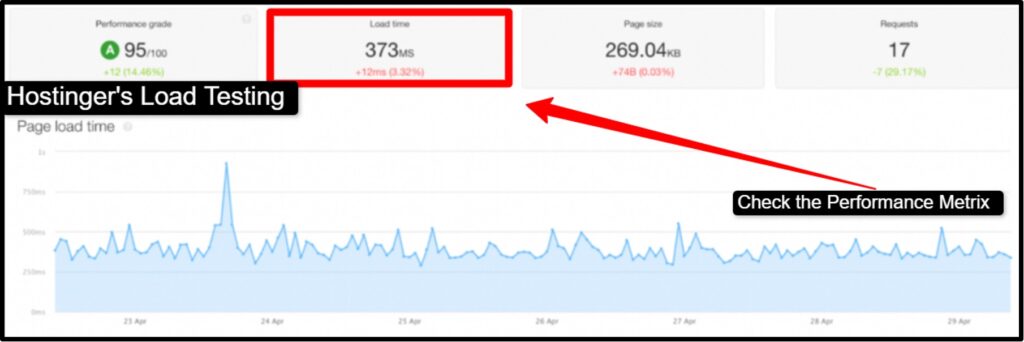
Here, in the above screenshot, we can see that the server takes 373ms to load a page size 269.04KB.
Hostinger’s LiteSpeed architecture gives it a strong advantage over TTFB in most tests. In Adwaitx’s controlled testing, Hostinger’s TTFB was recorded at 0.357 seconds. Bluehost’s TTFB in the same test was notably higher.
Bluehost’s move to Oracle Cloud infrastructure in 2025 improved its TTFB significantly for US users, which explains why US-focused tests show it performing well. Outside the US, the gap closes or reverses in Hostinger’s favor.
So here, Hostinger is good as far as global TTFB is concerned. Bluehost is good for US audiences.
Uptime Test
Uptime is the percentage of time your website is actually online and accessible. Even a 99.9% uptime guarantee means your site could be down for up to 8.7 hours per year.
Here is what independent monitoring actually found.
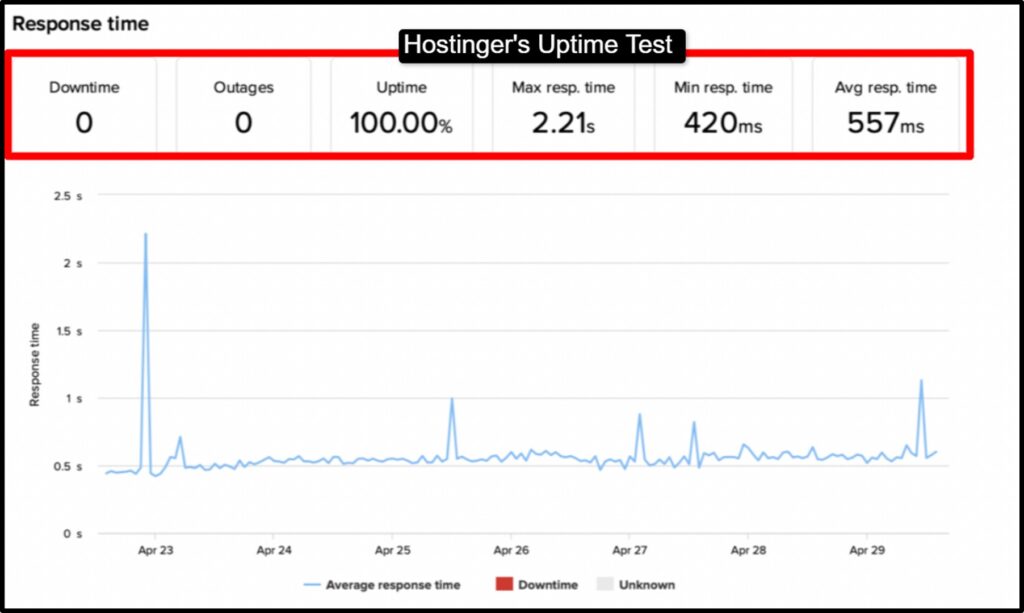
The results tell a consistent story.
Hostinger had fewer outages and shorter total downtime in head-to-head monitoring. Bluehost matched Hostinger on uptime in some tests but fell behind in reachability and outage frequency in others.
Both hosts also passed their guaranteed uptime SLA in almost every test.
For most websites, either host will give you reliable uptime. If you need enterprise-grade reliability with zero tolerance for downtime, managed cloud hosting from providers like Kinsta or Cloudways would be a better fit.
LiteSpeed vs Apache servers
These two are the web server software that Hostinger and BlueHost uses.
Hostinger uses LiteSpeed, one of the most advanced web servers available. Bluehost uses Apache, the most widely used and time-tested web server.
Many of you might not know about what a web server actually is, what it does and how it is important for you to know about it. First, let’s understand what a web server actually is!
You can think of a web server as a waiter at a restaurant.When a visitor comes to your website, their browser sends a “request”. The waiter (who happens to be the web server) gets that request, processes it, and delivers back your website content. The faster and smarter the waiter, the faster your website appears.
LiteSpeed and Apache are two different “waiters” that handle requests differently, with very different results.
Hostinger: LiteSpeed
Hostinger uses LiteSpeed, which is widely considered one of the most advanced web servers available.
LiteSpeed handles multiple simultaneous requests more efficiently than Apache, particularly for high-traffic websites. It also comes with a built-in cache (LSCache) that serves pages to visitors much faster by storing a ready-made copy rather than building the page fresh every time someone visits.
- Handles large numbers of simultaneous visitors more efficiently
- Built-in LSCache dramatically speeds up page delivery
- Lower CPU usage means better performance on shared hosting
- Works especially well with WordPress
Bluehost: Apache on Oracle Cloud
Bluehost uses Apache, the most widely deployed web server in the world with decades of real-world testing behind it.
While Apache is not as fast as LiteSpeed under heavy load, Bluehost’s move to Oracle Cloud infrastructure in 2025 closed much of the performance gap, especially for US users. Apache is also highly compatible with virtually every web application and plugin.
- Apache is the most battle-tested web server in existence
- Oracle Cloud backend provides excellent infrastructure for North American audiences
- No CPU throttling on plan overages, which is an advantage during traffic spikes
- Bluehost does not throttle your CPU if you go over your plan limits temporarily
So, Hostinger’s LiteSpeed gives it a global speed advantage. Bluehost’s Apache plus Oracle Cloud infrastructure wins for US-based sites and traffic spike resilience.
Ease of Use
The control panel is where you manage everything about your website: adding domains, installing WordPress, setting up email, managing files, and checking your hosting settings.
How easy it is to use directly affects how much time you spend frustrated versus actually building your website.
Hostinger (hPanel Experience)
Hostinger built its own control panel called hPanel from scratch. It is not based on cPanel, which is the industry-standard panel used by most other hosts. hPanel was designed to be clean, modern, and beginner-friendly.
- Clean, purple-themed interface with minimal clutter
- Common tasks like installing WordPress, adding a domain, or setting up email are all one click away from the main dashboard
- AI assistant Kodee is built directly into the panel to answer questions and guide you through tasks
- One-click WordPress installation completes in under two minutes
- Managing multiple websites is straightforward from a single account view
- AI logo maker and AI domain name generator are built in
- Mobile-responsive interface works on phones and tablets
- Available in multiple languages, making it accessible for non-English users
The one drawback of hPanel is that it is not cPanel. If you are moving from another host that uses cPanel, there will be a learning curve.
Some users also report that certain hPanel tasks run slightly slower than their cPanel equivalent.
Bluehost (cPanel Experience)
Bluehost uses cPanel, the most widely used hosting control panel in the world.
This is a major advantage for developers and anyone who has used web hosting before, because cPanel looks and works the same way across virtually every host that uses it.
- WonderSuite guides new WordPress users through setup step by step
- Built-in WordPress Manager lets you control all your WordPress sites from one dashboard
- Staging sites are built directly into the interface, useful for testing changes before they go live
- Advanced tools like SSH access, WP-CLI, and Git are easily accessible
- Every cPanel feature has extensive documentation and video tutorials online
The downside is that cPanel can be difficult for complete newbies.
The number of options on screen can be confusing if you have never used hosting before.
Hostinger’s hPanel is better for beginners. Bluehost’s cPanel is better for developers and users switching from another host.
- If you have never used web hosting before, Hostinger will feel more approachable.
- If you already know cPanel, Bluehost will feel immediately familiar.
Features Comparison
I’ve listed the features below!
This way you can compare the features of Hostinger and BlueHost and you can choose the provider as per the requirements.
Free Domain
Hostinger includes a free domain for one year on its Premium plan and above. The entry-level Single plan does not include a free domain.
Bluehost includes a free domain for one year with most of its hosting plans, including the Starter plan.
Note for Hostinger: domain privacy protection costs extra. Note for Bluehost: domain privacy is included on Business plans and above.
If you cancel Bluehost within your first year and use the free domain, a non-refundable fee of $15.99 applies.
Both Hostinger and Bluehost include free SSL certificates on all plans. SSL encrypts the connection between your visitor’s browser and your server. It is a basic requirement for any website today and is also a Google ranking factor.
Neither host charges extra for SSL.
Email Hosting
Hostinger includes free professional email accounts on all plans. Importantly, Hostinger includes free email marketing through its Reach tool for the first year, which is a significant bonus not found with most shared hosts.
Bluehost includes professional email accounts, but the free email period is only one month. After that, email hosting is billed as an add-on.
If professional email is important to you, factor this into your total cost of ownership when comparing prices.
Website Builder
Hostinger includes an AI-powered website builder called Horizons on all plans. Horizons can generate an entire website from a text description. It is one of the more advanced AI builders in the shared hosting market.
Bluehost includes an AI website builder integrated into the signup and onboarding flow.
Bluehost has also incorporated AI tools including access to ChatGPT, Claude, Gemini, and Grok through its AI All Access plan at $20 per month.
Backup Options
Hostinger provides weekly automatic backups on its Premium plan and daily backups on its Business and Cloud plans. Backups are free and automatic on all covered plans.
Bluehost includes weekly backups on entry plans and daily backups on Business and above. CodeGuard Basic, which adds automated backup scanning, is included as a paid add-on on entry plans but comes standard on higher tiers.
Security Comparison
Along with hosting services, security is also important! Solid security offers protection to the website so that you can go online easily.
I’ve listed the security features of both BlueHost and Hostinger.
SSL and DDoS Protection
Both Hostinger and Bluehost include free Let’s Encrypt SSL certificates on all plans. This is now a standard feature across the industry and neither host charges extra for it.
Both hosts also include DDoS protection and a web application firewall (WAF) on all plans. A web application firewall blocks common attack types like SQL injection and cross-site scripting before they reach your website.
This is included by default at Hostinger. Bluehost also includes a ModSecurity firewall on its shared plans.
Malware Scanning
Hostinger includes malware scanning on its plans and provides a built-in scanner within hPanel.
The malware scanner runs automatically and flags threats. This is included on mid-tier plans and above without requiring an add-on purchase.
Bluehost uses SiteLock for malware scanning.
On entry-level plans, you may need to purchase SiteLock as a paid add-on to get full scanning functionality. The Business plan and above includes more complete malware detection and removal. Bluehost also integrates CodeGuard for automated backup and recovery.
On this point, Hostinger gives you more security features at 0 cost. Bluehost’s full security suite requires upgrading to higher plans or purchasing add-ons.
Backup Systems
Hostinger: Weekly backups on Premium plan, daily on Business and Cloud plans. Backups are automated, stored offsite, and can be restored with one click from hPanel.
Bluehost: Weekly backups on Starter and above, daily on Business and above. CodeGuard Basic is available as an add-on on lower-tier plans and gives automated daily backups with malware scanning.
Included on Business plans.
Customer Support
LiveChat is the best support channel for hosting companies.
But let’s see what other support channels Hostinger and BlueHost offer.
Live Chat, Tickets, and Phone Support
Hostinger provides 24/7 live chat support across all plans. It does not offer phone support in the traditional sense.
WhatsApp support is available in select regions, but there is no direct phone line you can call.
As far as ticket support is concerned, after the testing, I’ve found out that both the providers offer easy ticket generation and quick ticket resolution features. The ticket is resolved right after 10 mins of generating the ticket.
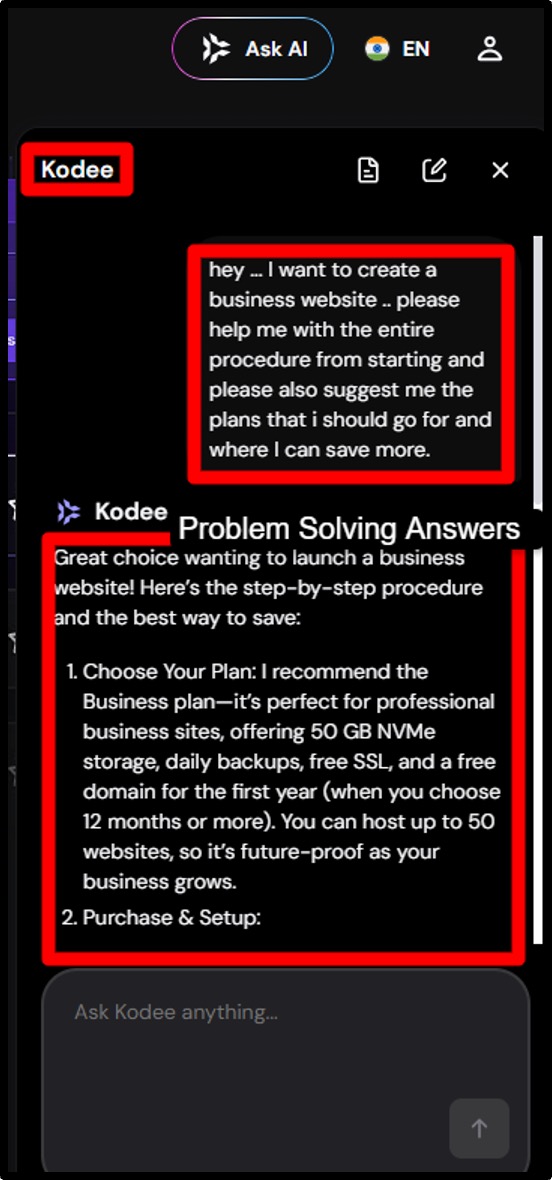
Hostinger’s Kodee AI assistant is available within the dashboard at all times and, according to Hostinger, resolves 81 percent of all support queries automatically in under 20 seconds across 50+ languages.
Bluehost provides 24/7 live chat on all plans and 24/7 phone support on Business plans.
This is a meaningful advantage for users who prefer speaking to a person, especially when dealing with a technical emergency that is not easily explained over chat.
So, as per my analysis, I see that the:
- Chat response by Hostinger is really straightforward and is highly responsive as well. Do not take time to think also. But the first response is given by Kodee (an AI assistance). And if the problem is grave, in that case, Hostinger sends to you a real agent.
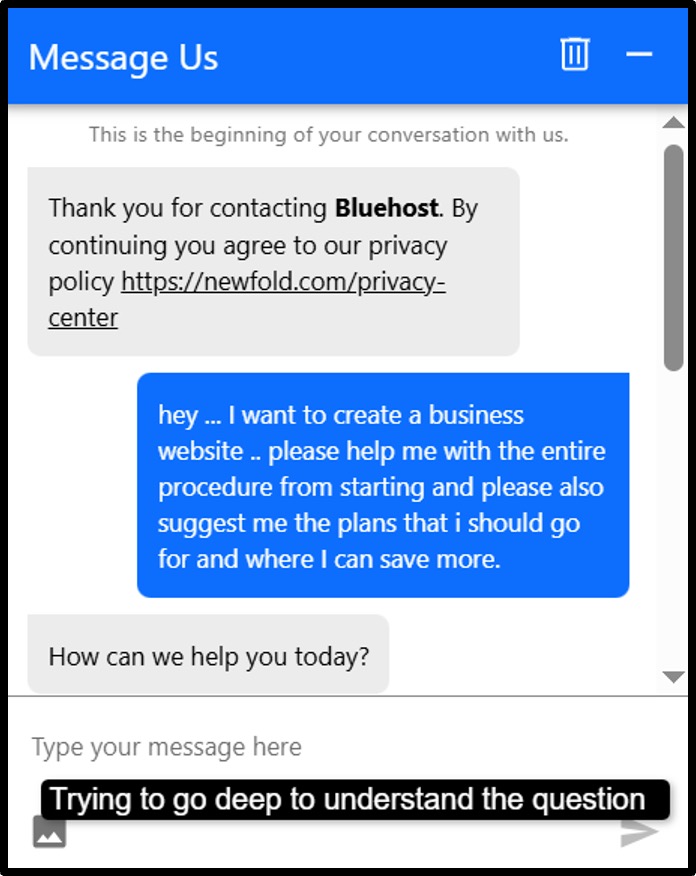
- Chat response by BlueHost is amazing. It is answered by a real user from the very beginning. They first try to understand you problem and ask series of questions that you need to answer if you want accurate
Response Time Comparison
Hostinger’s live chat typically connects you to a support agent within a few minutes.
Complex technical issues may take longer to resolve because there is no phone escalation path.
Bluehost’s chat support has received good reviews in user communities. Users report fast, helpful responses. But I’ve seen some comments on discussion forums where few other users have described long waits or being redirected multiple times.
Phone support, when available on Business plans, generally provides faster resolution for complex issues.
Support Quality
On user review platforms, Hostinger outperforms Bluehost.
On Capterra, Hostinger scores 4.5 overall against Bluehost’s 3.6. On G2, Hostinger receives 2.4 times more positive support mentions than negative, while Bluehost has more negative than positive reviews in the support category.
Hostinger’s knowledge base is regularly updated and covers a wide range of topics in plain language.
Bluehost also has a large knowledge base but some users report that certain articles contain outdated information.
So, in a nutshell, I can say that Bluehost is good if you want phone support and the ability to speak to a real person.
Hostinger is good on AI-powered chat support, multilingual accessibility and user satisfaction scores.
- If you are comfortable with chat and online tutorials, Hostinger’s support is fast and effective.
- If you are a non-technical user who may need to call for help, Bluehost’s phone support is a significant advantage.
WordPress Hosting Comparison
Both Hostinger and Bluehost offer WordPress hosting plans optimized for the platform. The performance differences show what you saw in the general performance section.
Performance for WordPress Sites
Hostinger’s LiteSpeed servers with LSCache plugin integration give WordPress sites a natural speed boost.
LiteSpeed Cache is one of the best performing WordPress caching solutions available and works automatically on Hostinger’s infrastructure.
Bluehost is the only hosting provider officially recommended by WordPress.org. This recommendation has existed for years and reflects Bluehost’s consistent support for WordPress, compatibility testing, and the quality of their WordPress-specific infrastructure.
In practical terms, both hosts run WordPress well.
The official WordPress.org recommendation for Bluehost carries real weight, especially if you want the peace of mind that comes from using a host the WordPress team stands behind.
One-Click Installation
Both Hostinger and Bluehost offer one-click WordPress installation.
- On Hostinger, the process completes in under two minutes through hPanel.
- On Bluehost, the WonderSuite guided setup walks you through WordPress installation step by step, which is particularly helpful for first-time users.
WordPress Optimization Features
Pros and Cons
After a complete analysis of both the providers, I’ve listed the pros and cons of using hostinger’s web hosting services and BlueHosts web services as well.
Hostinger
+Pros
- Best-in-class pricing for the features you get, starting from $2.99/month
- hPanel is clean, modern, and genuinely beginner-friendly
- AI-powered website builder (Horizons) is one of the most advanced in shared hosting
- Kodee AI assistant built into the dashboard to help at every step
- LiteSpeed servers deliver superior global performance
- 30-day money-back guarantee
-Cons
- No dedicated server hosting options
- Not officially recommended by WordPress.org
- No direct phone support, only live chat and WhatsApp in select regions
- Free domain only from Premium plan and above, not on the entry Single plan
Bluehost
+Pros
- Officially recommended by WordPress.org, the only major host with this distinction
- Dedicated server options available for high-traffic websites
- cPanel is industry-standard and familiar to millions of developers worldwide
- Bluehost Academy provides free WordPress learning resources
- No CPU throttling on plan overages, handles traffic spikes more gracefully
- Staging sites included on all plans
-Cons
- More expensive overall
- cPanel can feel cluttered and overwhelming for absolute beginners
- Full security suite (CodeGuard, SiteLock) requires add-on purchases on entry plans
Use Cases: Who Should Choose What?
Yes! This is really very important to understand, which provider to use when and for what purpose. That’s why, below, I’ve helped you understand to go with what provider when you have to use it for the listed things:
Beginners: Hostinger
If you are building your first website and have never used web hosting before, Hostinger is the better starting point.
hPanel’s clean interface, the built-in Kodee AI assistant, and Horizons website builder mean you spend less time figuring out how things work and more time building your site.
The lower price also means lower financial risk while you are still learning.
Bloggers: Bluehost
Bluehost is the go-to for bloggers, particularly WordPress bloggers. The official WordPress.org recommendation matters because it means Bluehost is tested, compatible, and supported by the WordPress team.
Bluehost Academy also provides a library of free learning resources to help bloggers grow their skills.
If your primary goal is a WordPress blog and you want to be on a host the WordPress community trusts, Bluehost is the right call.
Small Businesses: Both (Budget Decides)
Both hosts serve small businesses well.
The decision comes down to budget and location. For Indian and international small businesses looking to keep costs down,
Hostinger offers significantly better value, especially with its INR pricing option.
For US-based small businesses that want phone support, a staging environment, and the credibility of WordPress.org’s recommendation, Bluehost is worth the extra cost.
eCommerce Sites: Bluehost
Bluehost has dedicated WooCommerce hosting plans with eCommerce-specific tools, payment plugins, and inventory management features built in.
For online stores, Bluehost’s more comprehensive toolkit is worth the higher price.
Hostinger’s Business plan supports eCommerce but lacks Bluehost’s dedicated WooCommerce infrastructure and premium plugin bundles.
Developers and Agencies: Bluehost
Developers will feel immediately comfortable with Bluehost’s cPanel, SSH access, WP-CLI, and Git integration. Bluehost also offers dedicated server plans for agencies running high-traffic client sites.
Hostinger’s hPanel and VPS options work well for developers who do not need cPanel specifically, but cPanel’s familiarity is a genuine productivity advantage.
Hostinger vs Bluehost: Final Verdict
After testing both hosts across performance, features, support, and value, here is the honest summary.
Choose Hostinger if you are a beginner, a budget-conscious user, an Indian customer, or anyone building a personal site, portfolio, or small business website who wants the best value for money with excellent global performance. Choose Bluehost if you are a WordPress blogger, a developer who wants cPanel, a US-based business that needs phone support, or an eCommerce store owner who wants dedicated WooCommerce tools and the credibility of WordPress.org’s official recommendation.
FAQs
Is Hostinger better than Bluehost?
Yes! If you want budget-friendly hosting, in that case Hostinger is better than BlueHost. Bluehost is better for WordPress-focused users who want phone support.
Which is faster, Hostinger or Bluehost?
Hostinger is faster globally, particularly in Asia, Europe, and South America, thanks to its LiteSpeed servers. Bluehost is faster for US-based audiences, with some tests recording load times as low as 0.35 seconds for US visitors.
Is Bluehost good for beginners?
Yes, Bluehost is beginner-friendly. WonderSuite guides new users through WordPress setup step by step, and cPanel is well-documented with tutorials for every feature.
Can I migrate from Bluehost to Hostinger?
Yes. Hostinger offers free website migration on applicable plans. You can request a migration directly from hPanel. The process typically takes a few hours to complete. Make sure to test your site thoroughly after migration before canceling your Bluehost plan.
Is there a money-back guarantee?
Yes. Both Hostinger and Bluehost offer a 30-day money-back guarantee. If you cancel within 30 days of signing up, you can request a full refund. Note that domain registration fees are typically non-refundable, and Bluehost charges upto $15 domain fee if you use the free domain and cancel within the first year.
Which hosting is more secure?
Both hosts provide solid security. Hostinger includes more security features like WAF, DDoS protection, malware scanning, and free SSL on all plans. Bluehost offers a more complete security toolkit through CodeGuard and SiteLock, but these require higher-tier plans or paid add-ons. If you want maximum security without buying extras, Hostinger wins.
Which one is better for eCommerce and WooCommerce?
Bluehost has the edge for eCommerce. It offers dedicated WooCommerce hosting plans with eCommerce tools, payment processing support, and inventory management features. Hostinger’s Business plan supports WooCommerce but does not have the same depth of dedicated eCommerce infrastructure that Bluehost provides.
Conclusion
Hostinger and Bluehost are two of the most popular web hosts in the world for good reason. Both are reliable, both are affordable at entry-level prices, and both make it easy to launch a WordPress site quickly.
Hostinger has the edge on price, global speed, interface simplicity, and the volume of features included without extra cost. It is the better choice for beginners, international users, and anyone who wants the most performance for the least money.
Bluehost holds its ground with the WordPress.org official recommendation, phone support, cPanel familiarity, and a stronger WooCommerce setup. It is the better choice for WordPress-focused bloggers, US-based businesses, and developers who live in cPanel.
Both hosts offer a 30-day money-back guarantee, so you can always try one and switch if it does not fit your needs.
Whatever you choose, the most important thing is to get your website online and start growing.

