
9 Best A/B Testing Tools for CRO and Product Teams
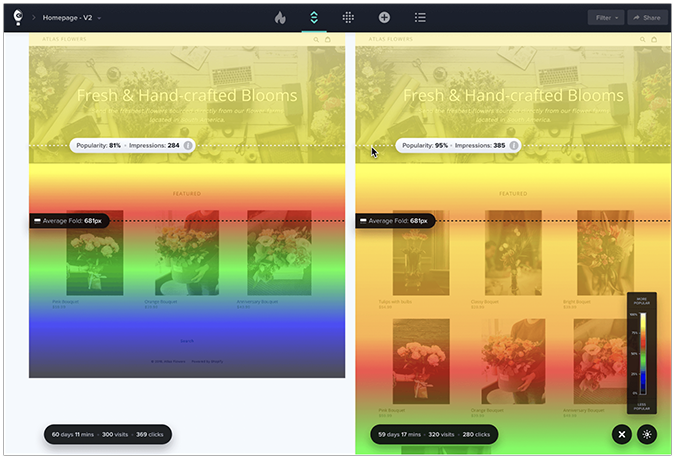

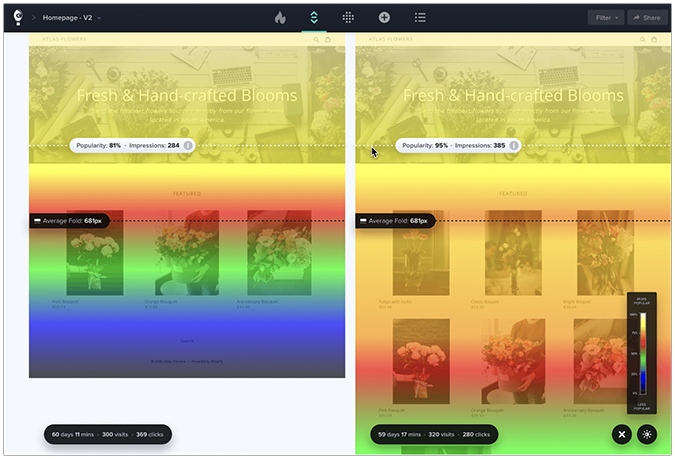
An A/B testing tool compares different versions of a website, app, or page to identify the best-performing variant. It measures the performance of a new variant (B) on a success metric, for example, click-through rate (CTR), bounce rate, conversion rate, or scroll depth, against the original version, called the control (A).
In the article, we review 9 excellent A/B testing tools for two use cases: website conversion rate optimization (CRO) and product development. We look at their capabilities, strengths and limitations, and pricing to help you choose the solution that meets your needs.
Best A/B Testing Tools: Overview
Here’s a list of the 9 best A/B testing tools you can use right now.
What to look for in an A/B testing tool?
When choosing an /B testing tool, consider these criteria:
- Use case: Do you need an A/B testing tool for CRO or for product development? Website and CRO tools run on top of the page through a visual page builder and let you quickly test different page versions. Product experimentation tools run inside your codebase behind feature flags, so engineers can test features, pricing logic, and in-app flows. Some tools do both, but most lean one way.
- Testing capabilities: Look for tools that enable split URL testing (sending traffic to separate pages), multivariate testing (changing several elements at once to find the best combination), multi-armed bandit tests (which shift traffic to the winner automatically), and A/A tests (which check the tool’s own accuracy).
- Testing engine: The tool needs a reliable statistical model (frequentist or Bayesian), guardrails against calling tests early, sample ratio mismatch detection, and flicker-free delivery to ensure test statistical significance.
- User behavior analytics: Look for tools that pair testing with heatmaps and session recordings, so you can build hypotheses and learn why one variant outperforms another.
- AI capabilities: Does the tool analyze your results and surface the patterns for you? Does it offer an MCP server so you can query the data from your own AI assistant? Does it let you run agentic workflows inside the platform?
- Targeting and segmentation: An A/B tool should allow detailed market segmentation, enabling you to run tests on specific user data (location, device, traffic source).
- Security and compliance: GDPR, HIPAA, and ADA compliance and robust security are necessary, especially for enterprise.
- User-friendly interface & easy setup: A strong A/B testing tool should be easy and intuitive to set up and run for both newcomers and experienced professionals.
- Integrations and API access: The tool should connect cleanly to the analytics tools, CMSs, and CRMs you already run, from Google Analytics and your data warehouse to your marketing stack, and offer API or SDK access for automation and custom workflows.
- Scalability: The A/B testing tool should be flexible to support your growing business needs, whether that means running high-volume tests, supporting multiple domains, or handling a sizable data flow at the same time.
- Transparent pricing: Quote-only pricing slows evaluation.
All the A/B testing tools in the roundup tick most of the boxes, but their exact specs differ.
Best A/B testing tools for website and ecommerce store conversion optimization
Crazy Egg: Best for Medium-Sized and Enterprise CRO Initiatives
Crazy Egg is a CRO and website user experience optimization platform that combines A/B testing with user behavior analytics, web analytics, and surveys.
Crazy Egg strengths:
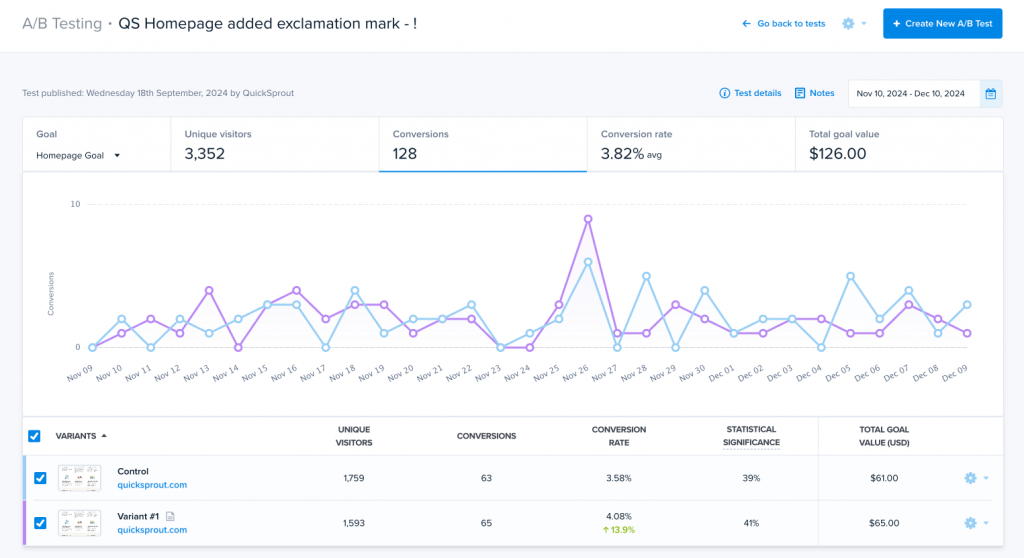
- Testing and behavioral analytics in one place. You can form informed test hypotheses, and when a variant wins or loses, heatmaps or recordings show you why.
- Fast and easy setup. Just add one code snippet to your website, or install it through Google Tag Manager, Shopify, WordPress, or Wix, and start testing in minutes.
- Codeless testing. The visual editor lets marketers create different variants without developer help for fast iteration. You can still drop into HTML, CSS, or JavaScript when you want more control.
- Granular audience targeting. By device, by country, UTMs, conversions, and any segment.
- AI data analysis. Crazy Egg’s AI analyzes heatmaps, session recordings, and web traffic, and summarizes key insights. You can also export heatmaps and recordings as AI-ready JSON for Claude, ChatGPT, or Gemini, and query your account data directly via its MCP server from your own AI assistant.
- Agentic AI. A new feature called Tasks sets up reports, reads the data and surfaces patterns, produces reports, and drafts variants for testing.
- Integrations. You can analyze user behavior in your Shopify store and sync web analytics data from Google Analytics.
- Security & compliance: Crazy Egg is GDPR and CCPA-compliant, and offers a DPA that also covers HIPAA obligations, with a public trust center documenting its security controls.
Crazy Egg limitations:
- Test types. You get A/B, split URL, and multi-armed bandit, but no multivariate or A/A testing.
- Simple statistics. Chi-square significance model, without the sequential testing or sample-ratio-mismatch guardrails high-volume programs lean on.
- It’s built for website and landing-page testing, not for in-app product or mobile app experiments behind feature flags.
Crazy Egg pricing:
- Free plan: web analytics, instant heatmaps, conversion analytics, and surveys.
- A/B testing is available in Plus $99/mo, Pro $249/mo, Enterprise $599/mo.
- All plans are billed annually, with no overages and unlimited domains and team members.
VWO: Best for Deep Experimentation at Scale
VWO (Visual Website Optimizer) is one of the longest-running website testing and conversion optimization platforms built for high-traffic marketing teams running a formal CRO program. It merged with AB Tasty in a January 2026 deal and now operates under the Wingify brand.
VWO strengths:
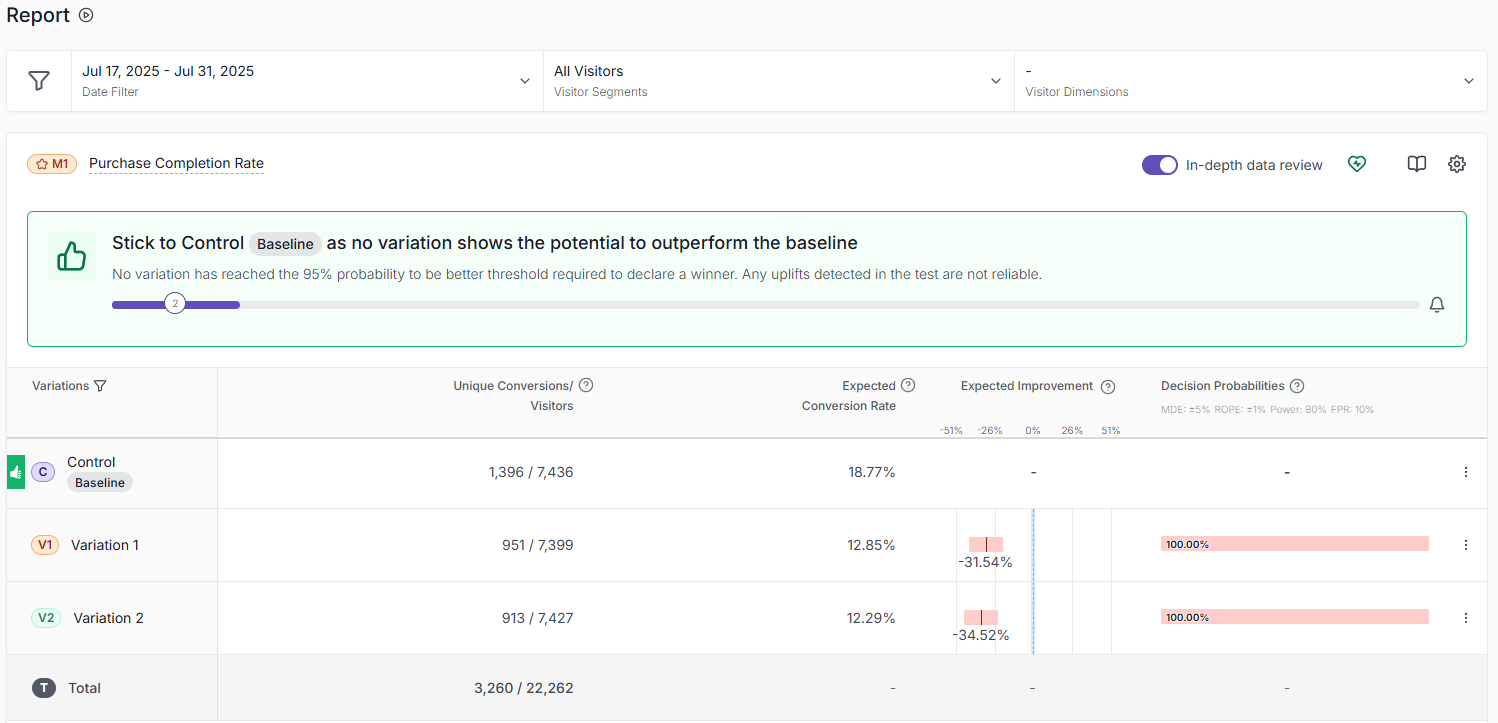
- Various test types with solid stats. A/B, split URL, multivariate, and multi-armed bandit testing, with a Bayesian engine (SmartStats) and server-side testing for teams that need it.
- Mature, all-in-one CRO. Testing sits alongside heatmaps and session recordings (VWO Insights) and personalization, so one platform can replace several tools.
- Strong visual editor. Marketers build and launch variations without code, and developers can add custom JavaScript for more complex changes.
- AI and MCP. An in-app AI assistant helps build and read tests, and VWO has offered an MCP server since 2025.
VWO limitations:
- Visual editor struggles on complex pages. It handles text, image, and button tweaks well, but layout, form, and responsive changes can be harder and may need a developer.
- Learning curve and slow reports. Advanced features take time to master, reports can load slowly, and some users find dashboard numbers diverge from GA4.
- Flicker. The script can cause a visible flash of the original page before a variant loads, especially on above-the-fold or full-page tests.
VWO pricing:
- Quote-based.
- The median annual contract is $16,330 with multi-module, higher-traffic deployments reaching mid-five to low-six figures (Vendr, 2026).
Unbounce: Best for Landing Page Testing
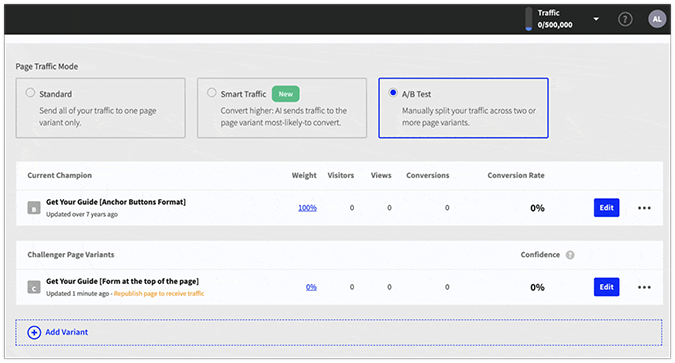
Unbounce is a landing-page builder with built-in A/B testing, aimed at marketers and agencies running paid marketing campaigns.
Unbounce strengths:
- Fast landing-page building. A drag-and-drop builder lets marketers create and launch pages without a developer, using templates, dynamic text replacement, and custom code where needed.
- A/B testing built in. Running page variants and tracking conversions is a core, well-rated feature, and on higher tiers, Smart Traffic routes each visitor to the variant most likely to increase conversions.
- AI copy and MCP. Smart Copy drafts headlines, CTAs, and page copy, and a new MCP server lets you build and manage pages from assistants like Claude.
- Easy integrations. It connects to HubSpot, Mailchimp, Salesforce, GA4, and the major ad platforms, which suits paid-traffic and agency workflows.
Unbounce limitations:
- Only tests Unbounce pages. A/B testing works on pages you build in Unbounce, not your existing website, so it is not a general on-site testing tool.
- Basic testing depth. You get A/B tests only, with no multivariate or multi-armed bandit, and reporting is light.
- No behavioral analytics. No heatmaps or session recordings, so you need outside tools to understand why a page doesn’t convert.
- Pricing and billing friction. Pricing has risen steeply in the past year, usage caps carry overage penalties, and billing and cancellation practices draw complaints.
Unbounce pricing:
- Starter $29/mo, Build $99/mo, Experiment $149/mo (where A/B testing starts), Optimize $249/mo (adds Smart Traffic). Annual billing is roughly 25% cheaper.
- Concierge and Agency plans are custom-priced.
AB Tasty: Best for Combining A/B Testing and Personalization
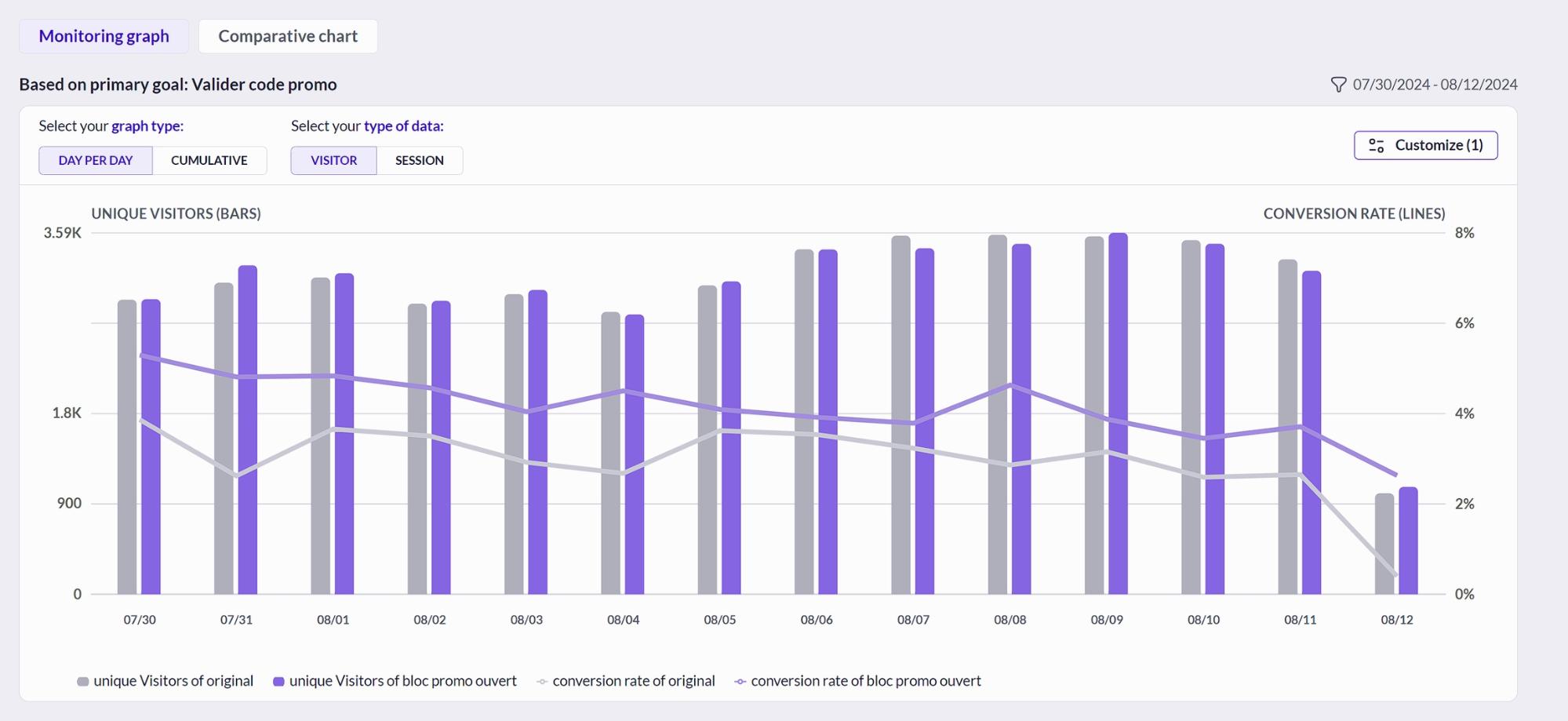
AB Tasty is an enterprise experimentation and personalization platform, now combined with VWO under the Wingify brand.
AB Tasty strengths:
- Multiple test types with solid stats. A/B, split URL, multivariate, multi-armed bandit, and server-side testing, with a Bayesian engine and a sequential testing alert that flags underperforming variations early.
- Testing without developers. A visual editor and widget library let marketers build and launch tests without dev tickets, with custom code available for complex changes.
- Built-in personalization. Beyond A/B testing, AB Tasty can serve tailored content and customer experiences to specific audiences, which is its main differentiator from pure testing tools.
- Strong targeting and segmentation. Segment target audiences by behavior, traffic source, and custom properties, and apply segments to both tests and personalized experiences.
- AI assistance and MCP. AI helps generate test ideas and read results, and an open-source MCP server is available for AI-assisted workflows.
AB Tasty limitations:
- Quote-based pricing. There are no public prices; cost scales with traffic, modules, and domains, and getting a number requires a sales call.
- Learning curve. Advanced features and complex setups are not especially user-friendly and take time to master, and some scenarios still need a developer.
- Thin behavioral analytics. It centers on experimentation and personalization rather than native heatmaps or session recordings, so to understand the “why”, you need other tools.
AB Tasty pricing:
- Quote-based only, with each product behind a “schedule a demo” request.
- Cost depends on traffic volume and the modules you buy (experimentation, personalization), and the number of domains.
- The median buyer pays about $66,500 a year. Testing-focused deployments typically run $15,000 to $50,000 (Vendr, 2026).
Optimizely: Best for Large-Scale Experimentation Programs
Optimizely is an enterprise experimentation platform that combines visual web testing with full-stack feature experimentation.
Optimizely strengths:
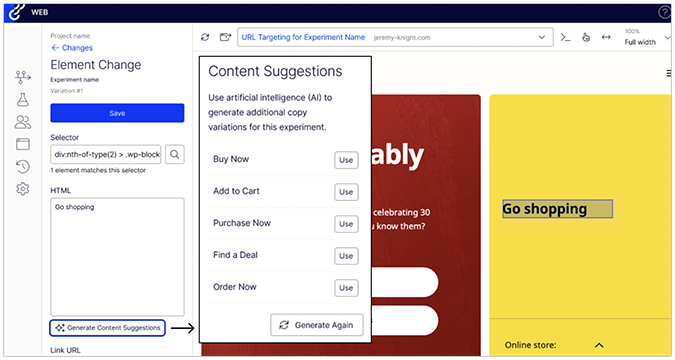
- Visual editor plus code. Marketers build tests in the visual editor without developers, while engineers drop into custom CSS and JavaScript for dynamic pages and complex changes.
- Opal AI agents. The Opal layer generates test ideas and helps build experiments, and reviewers credit its AI agent with making experiments easier to run.
- Rigorous statistics. The Stats Engine uses sequential statistics that let you read real-time results without inflating false positives, across A/B, multivariate, multi-armed bandit, and A/A tests.
- Enterprise program management. Role-based access, hypothesis and test-plan fields, global holdouts, and approval workflows support large, multi-team programs running many concurrent tests.
- MCP and integrations. Separate MCP servers for experimentation and analytics work with Claude, Cursor, and other assistants, alongside extensive APIs.
Optimizely limitations:
- Quote-based, enterprise pricing. There is no public pricing. Procurement data from Vendr puts experimentation around $50,000 to $80,000 a year for mid-market and $200,000 or more at enterprise, on top of $50,000 to $200,000 for implementation.
- Opal costs extra. The Opal AI layer is priced separately, on top of the platform.
- Steep learning curve. Reviewers describe it as intimidating to learn, and multi-step or multi-device tests often need significant custom code.
- Reporting gaps. Reviewers want more granular segmentation in reports and easier raw-data export.
- No native behavioral analytics. No heatmaps or session recordings.
Optimizely pricing:
- No public pricing; quote-based and aimed at enterprise budgets.
Best A/B testing tools for product and engineering teams
GrowthBook: Best for Engineering Teams on a Budget
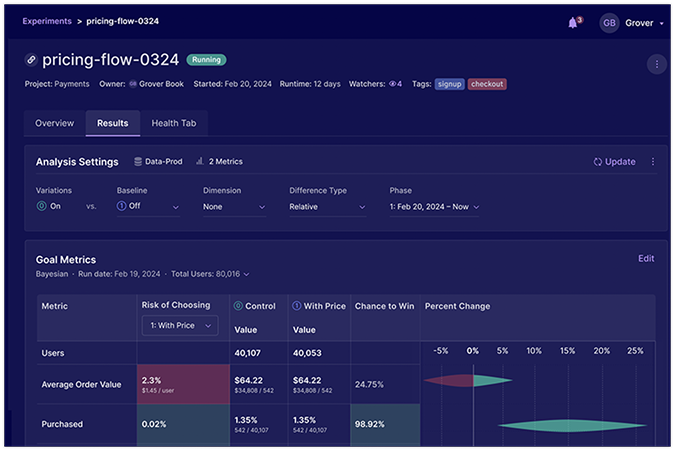
GrowthBook is an open-source, data warehouse-native feature-flagging and A/B testing software built for engineering and data teams.
GrowthBook strengths:
- Free and open-source. Self-host the open-source core for free, or use the free cloud Starter plan for up to three users, with unlimited feature flags, experiments, and traffic.
- Warehouse-native analysis. GrowthBook runs the numbers against your own BigQuery, Snowflake, Redshift, or Postgres and exposes the SQL, so your data team can see exactly how a result was calculated.
- Feature flags and experiments in one. Deploy behind a flag, run a percentage rollout, convert it into an experiment, and release the winner, across frontend and backend.
- Advanced statistics. Frequentist and Bayesian engines, CUPED, sequential testing, and multi-armed bandits.
- AI and MCP. An AI Visual Editor, AI-generated dashboards, and a hosted MCP server, so you can create flags and experiments from Claude, Codex, Cursor, and more.
- Product analytics. Track and analyze customer journeys in your digital products over time.
GrowthBook limitations:
- Needs engineering and a data warehouse. Setup, SDK configuration, and data validation require technical expertise, and self-hosting adds an operational burden.
- No customer behavior analytics. No heatmaps or session recordings, so you need other tools to understand why a variant won.
- Onboarding gaps. Thin getting-started guidance and dense documentation come up repeatedly in customer reviews.
GrowthBook pricing:
- Self-hosted open source: Free. Cloud Starter plan: free for up to 3 users, with unlimited flags, experiments, and traffic.
- Pro ($40/seat/mo) adds the AI Visual Editor, multi-armed bandits, advanced permissions, and premium support.
- Enterprise (custom pricing) with SSO/SCIM, audit logs, contextual bandits, holdouts, and an uptime SLA.
LaunchDarkly: Best for Quick Feature Rollouts
LaunchDarkly is a feature management platform where A/B experimentation runs on top of the feature flags your engineers use to ship and control releases.
LaunchDarkly strengths:
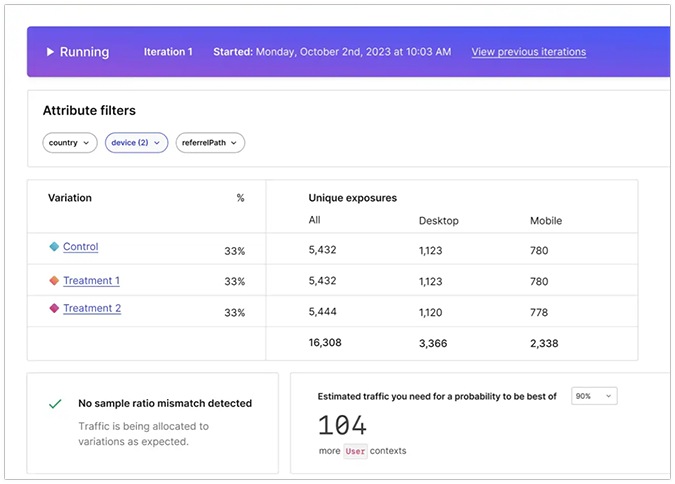
- Powerful experimentation and statistics. A/B split tests, multivariate, multi-armed bandit, and A/A tests run on flagged features, with Bayesian and frequentist stats, CUPED, sequential testing, and sample-ratio-mismatch detection.
- Feature flag management tools. Creating, targeting, and toggling flags is fast, kill switches work instantly, and you can roll back a feature with a toggle (no redeploy needed).
- Progressive delivery. Percentage rollouts, segment and attribute targeting, and canary-style ramps run across every environment from one place.
- Custom integrations. A strong REST API lets teams script their flag work, SDK coverage is broad, and flag setup works well through MCP with assistants like Claude.
- Enterprise governance. Approval workflows, audit trails, role-based access, and SSO on paid plans suit teams that treat flags as production infrastructure.
LaunchDarkly limitations:
- Experimentation is secondary to flags. It sits on top of flag management rather than being the core product, and reviewers say the stats and metric setup feel clunky next to dedicated A/B testing tools.
- No no-code visual editor, so every test needs a developer.
- No CRO-style behavioral analytics. No heatmaps, and its session replay and observability target debugging releases rather than understanding why a page converts.
- Stale-flag sprawl. Reviewers repeatedly ask for built-in stale-flag tracking, but for now, you have to manage flag cleanup manually.
- Hard to forecast cost. Usage-based pricing on service connections and client-side users scales quickly, and some renewals come in higher.
LaunchDarkly pricing:
- Developer: Free forever, with unlimited seats, 100,000 experimentation monthly active users, 5 service connections, and 1,000 client-side monthly active users.
- Foundation: Pay-as-you-go, at $10 per service connection and $8.33 per 1,000 client-side monthly active users billed yearly, with no seat fees.
- Enterprise: Custom pricing. A Guardian add-on for release monitoring and automatic rollback is priced separately (Enterprise only).
Statsig: Best for High-Volume Product Experimentation
Statsig is an experimentation platform that bundles A/B testing, feature flags, product analytics, and session replay in one tool.
Statsig strengths:
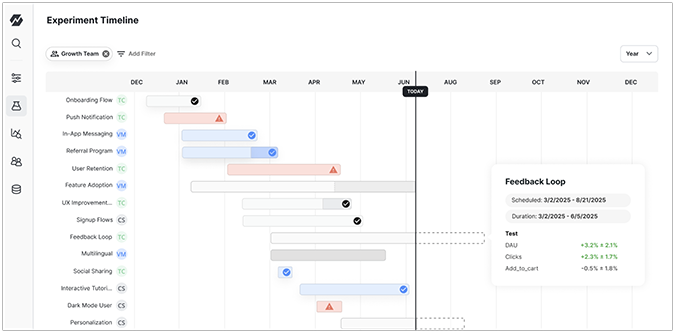
- Multiple test types. A/B, multivariate, multi-armed bandit, switchback, and server-side tests, with a warehouse-native option on Enterprise.
- Experimentation and analytics in one. A/B tests run alongside built-in product analytics, metrics, and session replay.
- Strong statistics with minimal setup. Statsig assigns traffic and keeps each visitor on the same variant across web and mobile, and it runs the reliability checks for you, including sequential testing and sample-ratio-mismatch detection.
- Fast experiment setup. Simple setup lowers the barrier to running tests, overrides make QA quick, and cloning past experiments speeds iteration.
- Precise targeting. Run tests on specific audiences, by location, device, plan, or past behavior, and break the results down by the same segments.
- Enterprise-grade security. Single sign-on, role-based access, and HIPAA eligibility available on Enterprise.
Statsig limitations:
- Hard to debug assignment. When gates, exclusions, and experiment layers interact, there is no clear trace of which rule bucketed a user without reading SDK logs.
- Engineer-oriented. Documentation and workflows are built for engineers; onboarding non-technical teammates takes engineering help, and there is no visual editor.
- No heatmaps. It has session replay but not heatmaps, so you don’t get a complete picture of the “why” behind the result.
Statsig pricing:
- Developer: Free, with 2 million events a month, 50,000 session replays, unlimited seats, and A/B testing, feature flags, and analytics included.
- Pro: $150/mo, with 5 million events included (then $0.05 per 1,000), 100,000 session replays, and advanced experimentation and analytics.
- Enterprise: custom pricing, with warehouse-native deployment, SSO and RBAC, and HIPAA eligibility.
PostHog: Best for Startups Consolidating Product Tools
PostHog is an open-source product platform that bundles analytics, session replay, feature flags, experiments, and surveys, with A/B testing built on the same feature flags and event data.
PostHog strengths:
- Everything in one place. Analytics, funnels, session replay, flags, experiments, and surveys share the same event data.
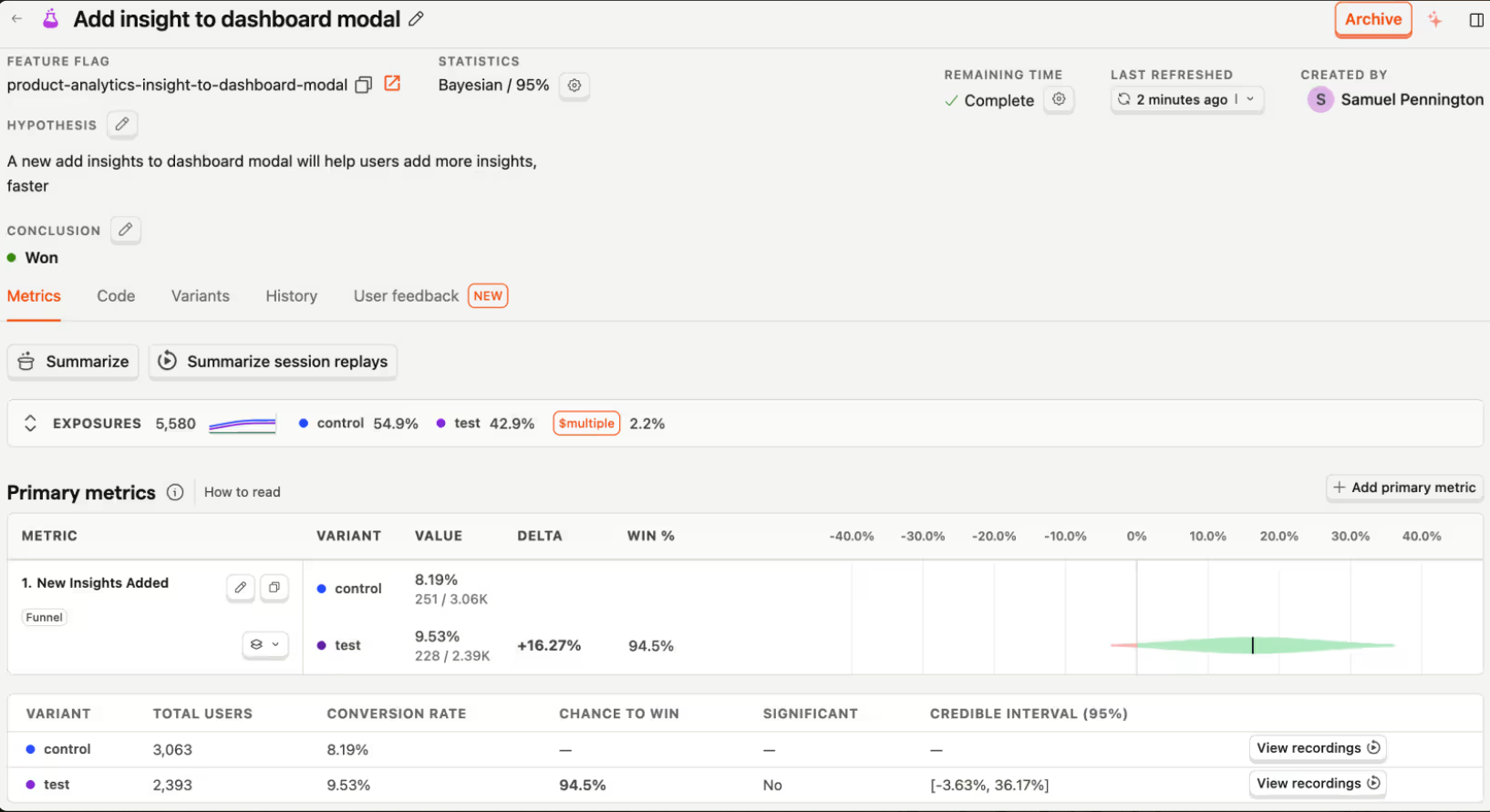
- Session replay tied to results. Experiment outcomes sit next to recordings of real user behavior, so you see what happened and why in one place.
- Developer-friendly and open-source. An MIT-licensed open-source version, a self-host option, clear getting-started docs, and MCP support suit engineering-led teams.
- Flexible statistics. Experiments support Bayesian or frequentist analysis, and a self-driving scout (in beta) audits running experiments for validity problems like skewed splits.
- Generous free tier. The free plan includes 1 million analytics events, 1 million feature-flag requests, and session replays each month.
PostHog limitations:
- Built for engineers, not marketers. Experiments run on feature flags and coded variants, so there is no no-code visual editor, and you need a developer for each test.
- Steep learning curve. The sheer number of features is overwhelming at first, and clean setup of events and dashboards takes planning.
PostHog pricing:
- Usage-based and billed per product, with no annual commitment required.
- Free tier each month: 1 million analytics events, 1 million feature-flag requests, and 5,000 session replays, with experiments billed through feature-flag usage.
- Pay-as-you-go after the free tier, with per-product spend caps; platform features like SSO and audit logs come with custom pricing.
My Verdict: Which Is the Best A/B Testing Tool?
There’s no single winner, because the best tool depends on who runs the tests and what you need to learn from them.
- For website and ecommerce CRO, Crazy Egg is the strongest all-round pick. It’s the one tool here that pairs A/B testing with the heatmaps, recordings, and surveys that tell you why a variant won, at prices published on the site and without developer help.
- For large, multi-team programs, Optimizely brings the scale and governance, if you have the team and budget to run it.
- For engineering and data teams, GrowthBook and PostHog offer open-source, warehouse-native testing.
If you want testing and the behavioral insight to act on it in one platform, Crazy Egg’s team can help you find the plan that fits your traffic and walk you through setup. Contact Sales today!
A/B testing tool FAQs
What replaced Google Optimize?
Google sunset Optimize and Optimize 360 on September 30, 2023, and didn’t replace them with a native product. For a free replacement, GrowthBook (open-source) and PostHog both include A/B testing on their free tiers; for a marketer-friendly option with behavioral analytics built in, Crazy Egg covers A/B testing plus heatmaps and recordings.
Does GA4 have built-in A/B testing?
No, Google Analytics 4 has no native A/B testing. However, many third-party tools integrate with GA4. So you can import segments and events for your tests, and then analyze the results in GA4.
What is the best free A/B testing tool?
GrowthBook is the most capable free A/B testing solution: open-source and free to self-host, with unlimited experiments and traffic. PostHog includes A/B testing in its usage-based free tier, and Statsig’s free Developer plan covers testing and analytics.
Is A/B testing the same as multivariate testing?
No, A/B testing and multivariate testing aren’t the same. An A/B test compares two or more complete versions. A multivariate test changes several elements at once to find the best combination, which needs more traffic to reach reliable results.

