
WPVibe Hits 40,000 Sites, a New WPForms Dashboard, and Two WordPress Security Updates

September was the month WordPress plugins really started talking to AI assistants in a serious way. You can now manage backups, forms, online stores, and fundraising campaigns just by asking Claude or ChatGPT, and there’s a good chance you already have some of these plugins installed.
WordPress shipped two security releases and WooCommerce shipped two more, so please update before you read the rest.
As always, we’ll walk you through what happened, why it matters, and how you can use it on your own site.
WPBeginner Spotlight brings you a monthly roundup of the most important WordPress news, updates, and community happenings.
Got something to share? Whether it’s a new product launch, a significant update, or an exciting event, reach out to us through our contact form, and your news could be featured in the next edition!
WPVibe Passes 40,000 Installs, Launches Fleet Management, and Learns Six More Plugins
WPVibe is a free WordPress MCP plugin that connects your WordPress site to AI assistants like ChatGPT, Claude, and Cursor. You simply describe what you want in plain language, and the AI takes care of the work on your site.
The plugin crossed 40,000 active installs on September 23, just two weeks after hitting 20,000, and its WordPress.org rating sits at 5 out of 5.
Syed Balkhi shared the milestone along with a list of everything the team shipped in one week. The biggest addition to WPVibe is the new Fleet Management feature.
If you manage more than one WordPress site, you can now ask your AI assistant which updates are pending across all of them and then run those updates from a single chat.
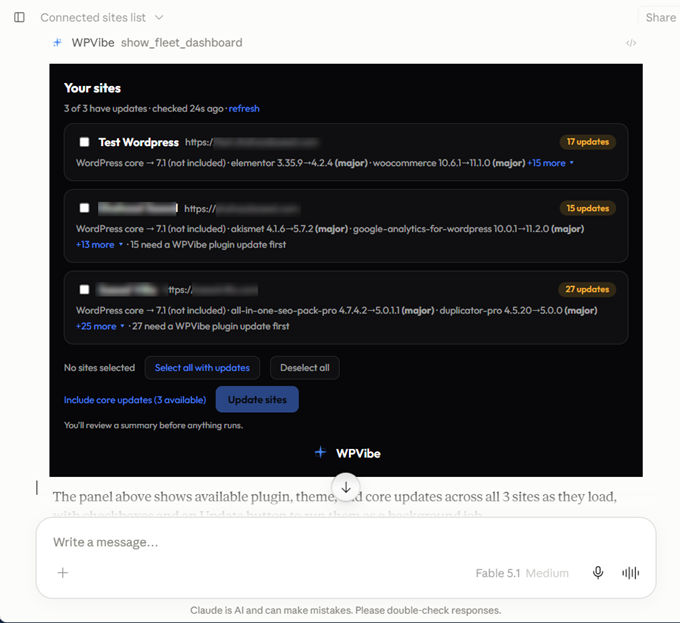
Here is what makes it different from a typical site manager tool. WPVibe checks every site before and after each update to make sure the update was completed successfully and the site is still working as expected.
WordPress core updates stay out unless you include them, and even then, the job pauses for your approval. If one site runs into an issue, the others keep going.
You can even close the tab while the job is running. The updates continue in the background and finish on their own. Fleet Management is included with every WPVibe plan, including the free plan. The plans differ only in how many AI actions you can run each day, not in which features you get.
Another important development is the growing list of plugins your AI can now understand. These integrations use the WordPress Abilities API, a standard that lets plugins describe what they can do in a format AI assistants can understand.
WPVibe tests each integration and publishes ready-to-use prompts, which it calls recipes. Here’s what was added in September:
- All in One SEO: You can ask which posts are missing a meta description and have the AI write one based on the post content. 13 SEO operations work in the free version.
- WPForms: You can build a contact form from a single sentence, or ask the AI to improve the labels and required fields on a form you already have. Five of the six recipes work with WPForms Lite.
- WPCode: Instead of only writing new snippets, the AI can now see which code snippet failed, on which line, and on which page.
- Easy Digital Downloads: You can pull sales reports, create discount codes, and add new products from one chat. We cover this in more detail below.
- PushEngage: You can create subscriber segments, check your setup, and send a push notification once you’ve approved the exact text.
- Duplicator: The AI can take a backup before it touches a plugin update and will wait until the backup is complete before continuing.
- SVG uploads: WPVibe 1.19 lets your AI add SVG logos and icons to the media library. It strips scripts from every file first, since embedded scripts are the reason WordPress blocks SVG uploads by default.
Along with these integrations, a new four-step setup page arrived in wp-admin. It tests the connection from both inside and outside your site.
If something is blocking the connection, such as a security plugin that has disabled application passwords, the page tells you exactly what to fix in plain language.
We believe this is where WordPress management is heading. The AI assistant you already talk to every day is becoming the place where you run your website.
WPForms Launches a Dashboard That Shows Every Form’s Entries, Payments, and Views in One Place
WPForms is the most popular drag and drop form builder for WordPress, used on more than 6 million websites. On September 17, it gained a new Dashboard that shows how every form on your site is doing the moment you log in.
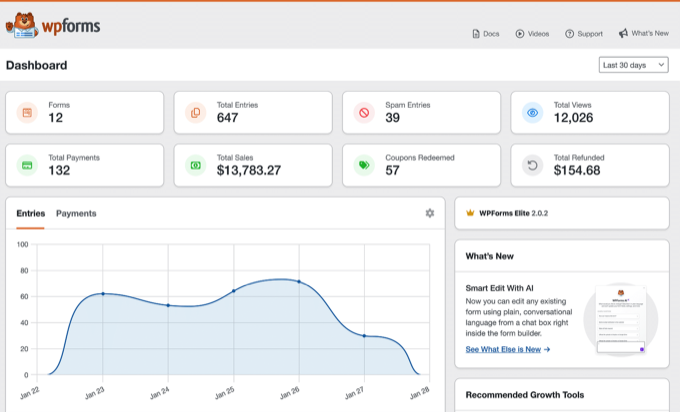
Until now, you had to open each form separately to see how it was performing. The new Dashboard puts all of them side by side, so you can quickly see where activity is growing and which form needs your attention next.
Here’s what you’ll see on the Dashboard:
- Site-wide numbers: Stat cards for forms, entries, payments, views, and spam, each one a single figure for your whole site.
- An entries feed: A chart of activity over your chosen date range, with a table listing every form alongside its entries, views, and conversion rate.
- Payment totals: Daily payment totals with summary cards for sales and subscriptions.
- Top visitor locations: The countries your form entries come from.
- Next steps: Suggested addons and integrations based on how you use WPForms. These change as your setup grows.
There’s nothing to install or configure. The Dashboard opens as soon as you click WPForms in your admin menu, and it’s included with every plan, including the free WPForms Lite.
One more addition arrived just after our last issue. WPForms QR Code creates a scannable code for any form, and a visitor at an event or in your shop can open the form on their phone with one scan.
WordPress 7.1.1 and 7.1.2 Fix 12 Security Issues, and the Roadmap to WordPress 7.2 Is Out
Two WordPress releases arrived within a week of each other, and both of them matter for your site’s security. If you have automatic updates turned off, update today, but take a full backup first.
WordPress 7.1.1 landed on September 17 with 17 fixes in core, 19 fixes in the block editor, and 11 security fixes. Rafie Muhammad from Awesome Motive reported one of those security issues.
WordPress 7.1.2 followed on September 22 with a single fix for a critical vulnerability. Under certain server and theme conditions, an attacker without a login could trick WordPress into loading a local PHP file.
The core team backported the fix all the way back to WordPress 4.7, so older sites are protected as well. Looking ahead, the team also published the Roadmap to WordPress 7.2.
The release is planned for early December 2026. Here’s what the team is working on, though as with every roadmap, not everything will make it into the final release.
- Notes get suggestions and reactions: The collaboration notes introduced in 7.1 are expanding to include suggested edits and emoji reactions.
- Sudo mode: WordPress will ask you to confirm your password before sensitive actions, similar to how your bank does.
- Secrets API: A safer place for plugins to store API keys and credentials.
- Table of Contents and Description List blocks: Two long-requested blocks that you’ll be able to use without a plugin.
- A new default theme: The team has proposed a minimal blog theme called Ipsum, and default themes will move away from year-based names.
AI features will stay in the official AI plugin for now. The team’s position is that AI needs to show clear adoption and value before it moves into core, and we think that’s the right call.
Duplicator Brings AI Backups, AutoTune, and Pro’s Backup Engine to the Free Plugin
Duplicator is a WordPress backup and migration plugin with more than 1 million active installs. On September 22, the team called Duplicator 5.0 the biggest update it has ever released.
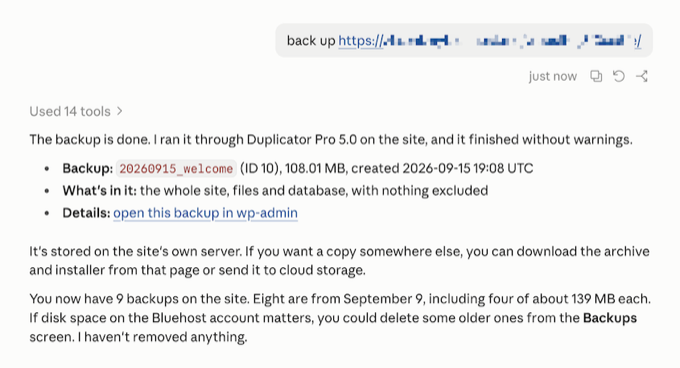
One of the biggest new features is AI-powered backups. Duplicator now uses the WordPress Abilities API to give connected AI assistants three backup-related actions.
Your AI assistant can list existing backups, create a full or database-only backup, and check whether a backup has finished. That may sound simple, but it adds an important safety step to AI workflows.
Before your assistant updates a plugin or makes changes across dozens of posts, it can create a backup first. The feature is available in the free plugin and requires WordPress 6.9 or later.
The rest of the release is just as practical:
- AutoTune: When a backup fails, the fix is usually a single setting, but most people don’t know which one. AutoTune runs real test backups on your server and adjusts the setting that caused the failure until a backup succeeds. You’ll find it under Tools » AutoTune.
- Duplicator Cloud for Lite: Free users can now store backups off-site in Duplicator’s own cloud storage, with no Pro license or third-party account needed. You can restore from the cloud even when your server is completely down.
- One engine for Lite and Pro: Both versions now run on the same backup engine, so free users get the same reliability improvements as Pro.
- One-click restore and encryption: Restore your site from inside wp-admin, and protect backup files with a password.
- Server Overview: A pass or fail panel for worker mode, loopback requests, and PHP time and memory limits, with advice when something needs attention.
Backups are one of those things most site owners set up once and never think about again. Duplicator 5.0 makes that first setup far less likely to fail, which is where most backup problems start.
Easy Digital Downloads Now Works With Claude and ChatGPT: Sales Reports, Discount Codes, and New Products From One Chat
Easy Digital Downloads is the plugin for selling digital products like ebooks, software, and music in WordPress. The free version has more than 40,000 active installs, and paid plans add features like recurring payments and software licensing.
On September 23, the team announced that Easy Digital Downloads now works with an AI assistant. Version 3.7.1 adds 25 abilities that cover orders, customers, products, discounts, sales reports, email and download logs, and store settings.
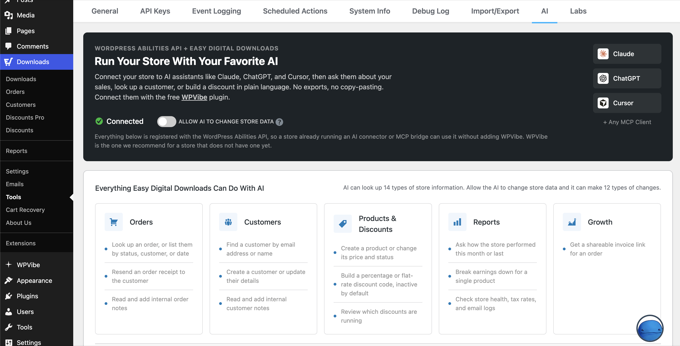
In practice, this means you can ask Claude or ChatGPT for last month’s sales report, including refunds and average order value. You can also ask for a discount code with a start date, end date, and usage limit, and the AI will create it as inactive so you can review it before it goes live.
You can even hand the AI a list of finished products, and it will add them as drafts with descriptions already written, ready for you to attach the files.
Customer support gets easier too. When a customer says their download never arrived, the AI can look up the order, the receipt log, and the download log in one go.
You’ll find the setting under Downloads » Tools » AI. Read and write access are separate, so you decide whether the AI can only report on your store or also make changes to it.
Running a store used to mean filling in the same forms over and over. With this release, you can hand off the repetitive half of the job while still keeping the final approval for yourself.
Charitable Lets AI Assistants Create Fundraisers and Log Donations, and Adds Tiered Rates for Fee Relief
Charitable is a donation and fundraising plugin for WordPress, with a free Lite version and paid plans for nonprofits that need recurring gifts, peer-to-peer campaigns, and more. It had a busy September.
The biggest update is that AI assistants can now create fundraisers and manage donations. You can type a single sentence into ChatGPT or Claude, and a draft campaign appears inside Charitable’s drag-and-drop builder.
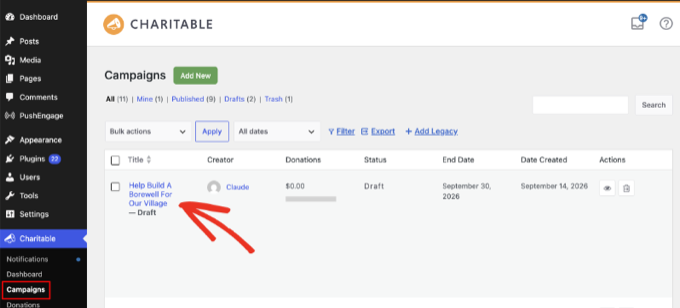
The AI builds the campaign from a template, with suggested donation amounts already scaled to the fundraising goal you mentioned. And campaigns are just the start.
You can also log a donation that arrived as a check in the mail, add a new donor to your records, or add a required dropdown field to an existing donation form. This is a Charitable Pro feature, and anything the AI creates is saved as a draft for you to review first.
The second update is Tiered Rates for Fee Relief. If you’re not familiar with it, Fee Relief asks donors a simple question at checkout: would they like to cover the processing fee?
Until now, that question used a single rate for each payment gateway, which doesn’t always make sense. A $10 gift and a $500 gift don’t feel the same to the donor.
You can now set up donation bands, each with its own percentage and fixed fee, plus an optional maximum. The setting lives under Charitable » Settings » Advanced » Fee Relief on the Plus plan and higher.
Charitable also shipped three smaller releases:
- Visual Automation Builder: Build donor follow-ups as a trigger, conditions, and ordered actions on a drag-and-drop canvas.
- Windcave recurring donations: Monthly giving for nonprofits in New Zealand and Australia using the Windcave gateway.
- Beacon templates in Charitable Lite: More ready-made campaign designs, now in the free version.
Universally Adds Automatic Language Redirects, and BuddyBoss Now Translates What Members Write
Universally is an AI translation service that translates your website into 110+ languages automatically. There’s a free plan, and paid plans are priced per site.
Universally for WordPress 1.0.9 arrived on September 17, and the main addition is automatic language redirects. So if a visitor’s browser is set to Portuguese and they open your English homepage, they land directly on the Portuguese version without having to find a language switcher.
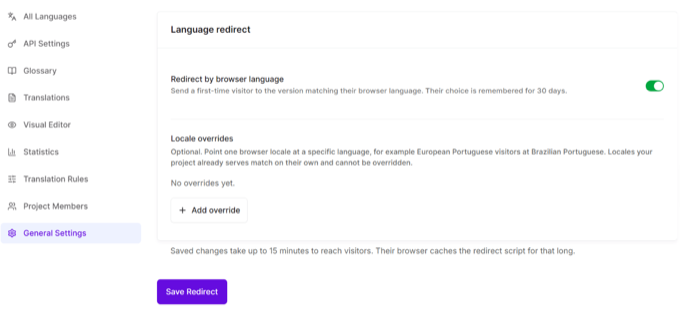
Visitors still stay in control. If they switch to another language, Universally remembers that choice for 30 days, so nobody gets stuck in a translation they don’t want.
The release also gives you more control over how Google treats your translations. You can now tell search engines whether a translation is meant for French speakers everywhere or only for visitors in France, without having to touch the hreflang tags yourself.
There’s related news for community sites too, because BuddyBoss now integrates with Universally. Most translation plugins only translate the pages you publish. This integration translates what your members write as well.
That means a Spanish-speaking member and an English-speaking member can read each other’s posts and comments in real time. For a community that spans several countries, that removes the biggest barrier to conversation.
ConsentLayer Releases Cookie Inspector, a Free Chrome Extension That Shows Exactly Which Cookies Your Site Sets
ConsentLayer is a cookie consent solution for websites that people build and manage with AI tools. You can ask ChatGPT, Claude, or Cursor to install it, and it will set up the right consent rules for each region.
The free plan covers most small websites. This month the team released Cookie Inspector, a free Chrome extension.
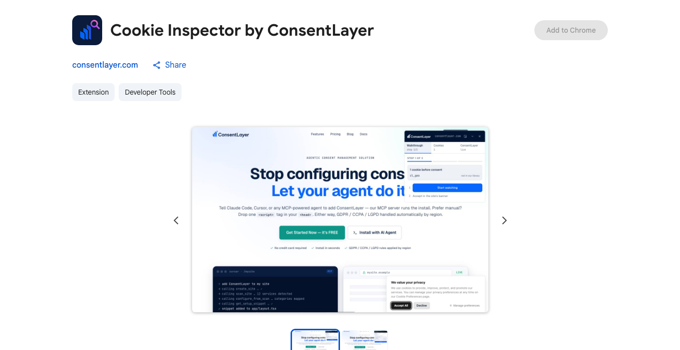
Open any page, and it shows you which cookies are set, when they were set, and which script set them. The really useful part is the consent check.
Click Accept on your own cookie banner, and Cookie Inspector shows you exactly which cookies that click released. If a tracking cookie shows up before anyone has accepted, then your banner isn’t doing its job.
It works with any cookie banner, not just ConsentLayer’s. If you’ve ever wondered whether your consent setup actually works, this is a quick way to find out.
WooCommerce 11.1 Puts Variation Galleries in Core and Adds Order Withdrawal, With Two Security Releases and 11.2 Beta Following
WooCommerce released version 11.1 on September 1 with 561 changes from 77 contributors. Three changes stand out for store owners.
- Variation image galleries: Each product variation can now have its own set of images, right in core. This replaces the Additional Variation Images extension, and your existing images migrate automatically.
- Right to order withdrawal: Customers in the EU can cancel an order within the 14-day window the law gives them, right from their account.
- Faster Store API and REST requests: Variable product pages and block registration both got performance improvements.
Two security releases followed the main release. WooCommerce 11.1.1 arrived on September 18 and also fixed a Mini-Cart bug, and 11.1.2 came on September 22 with a fix for a loop in the new variation galleries that affected some themes.
If you haven’t updated to 11.1.2 yet, please do so now. Next up is WooCommerce 11.2, now in beta and scheduled for the week of October 6.
It brings editable order withdrawal emails, a product CSV importer that matches existing products by barcode, date fields at checkout for birthdays and delivery dates, and sticky product filters. There’s also a new theme worth keeping an eye on.
Purple is WooCommerce’s first official block theme, back in public beta after a pause, with ten color palettes, ten font pairings, and a pattern library built for stores. It’s on GitHub for now and will come to the WordPress theme directory once testing is complete.
QuickSnip Adds a Loom Importer So You Can Move Your Whole Video Library
QuickSnip is the screen recording and screenshot tool that our founder Syed Balkhi built with his college roommate, and we covered it when it launched last month.
It records in 4K with AI captions and gives you a shareable link the moment you stop recording. Paid plans start at $6 per month.
Several people asked whether they could bring their old Loom recordings over, so the team built a Loom importer. Just connect your Loom account, and your whole library moves over, so switching doesn’t mean losing years of walkthroughs.
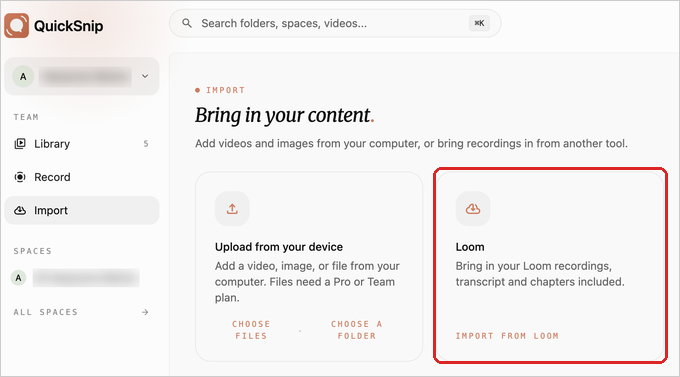
If your existing library was the only thing keeping you on Loom, that reason is gone.
In Other News
PushEngage, the web push notification and customer engagement platform, launched free Chrome and Firefox extensions. Open any page on your site, and the extension uses AI to draft a push notification from the page content, ready to target and schedule without opening the dashboard.
OptinMonster, the popup and lead generation toolkit, added Campaign Teasers on Plus plans and higher. A popup, fullscreen campaign, or floating bar can now start as a small tab at the edge of the screen. When a visitor closes the campaign, it shrinks back into that tab instead of disappearing for the rest of their visit.
Agencies also get Analytics Exports to CSV on Pro and Growth plans. The export covers the campaigns, date range, and columns you choose.
Smash Balloon, the social feeds plugin family, had a busy month. Reviews Feed Pro can now pull your Airbnb reviews onto your own booking page, and Feed Analytics Pro 2.0 shows which review and which post earns clicks.
You can also set up Facebook Events feeds from your own Facebook app. The Instagram plugin now warns you when a feed stops updating.
Sugar Calendar, the event calendar plugin, added Registration Forms. You can ask ticket buyers and RSVP guests custom questions such as meal choice, shirt size, or workshop track, either before or after checkout. The answers are saved on the attendee record right next to their ticket.
Thrive Themes rebuilt Thrive Leads, its opt-in form plugin, from the ground up with a new dashboard, a form wizard, and a My Forms screen. Everything you already built carries over.
Thrive Apprentice, its course plugin, now shows students the exact date their next lesson unlocks. It can also drip whole chapters at once.
WPConsent, the WordPress privacy compliance plugin, introduced Banner Analytics in version 1.1.9. It shows how many visitors saw your cookie banner and left without making a choice, which gives you an idea of how much of your traffic your analytics never sees.
The plugin also passed 200,000 installs at the end of August. That is double the 100,000 it celebrated last November.
All in One SEO extended its TruSEO content score to category and tag pages in version 5.0.1. Category and tag archives often rank well, yet site owners rarely optimize them, so this closes a gap that many sites have.
Uncanny Automator, the no-code automation plugin, shipped versions 7.5 and 7.6 with FluentCart, FluentBoards, All-in-One WP Migration, Really Simple Security, and Site Kit by Google integrations. Everyone on the free Automator Lite plan now gets starter access to Uncanny Agent, its AI assistant.
Pretty Links, the link shortener for WordPress, launched a UTM Builder. You fill in the campaign, source, and medium, and Pretty Links builds the tracking parameters for you while keeping the shared link short and branded.
Advanced Coupons, the coupon toolkit for WooCommerce, added Tiered Cart Discounts. One coupon can hold several spend thresholds, and the cart automatically applies the highest tier it reaches.
Customers can also now redeem loyalty points for products and coupons. Tiered Cart Discounts requires the Premium version.
BuddyBoss, the community platform for WordPress, shipped Email Digest, the most requested feature on its roadmap. Members can choose daily or weekly notification summaries instead of getting one email per event. It’s included on the Start plan and higher.
StoreAgent, an AI platform for WooCommerce stores from the WPBeginner Growth Fund family, now lets you connect Claude, ChatGPT, or Cursor to your store. The connection uses MCP, short for Model Context Protocol, which is the standard that AI assistants use to talk to outside tools.
You can ask for today’s orders, have the AI write missing product descriptions, or create a coupon from a single sentence. You approve the connection from your own store and choose between read-only and read-and-write access.
aThemes released a Delivery and Pickup module in Merchant Pro, its WooCommerce toolkit. Shoppers choose Shipping, Pickup, or Delivery and pick a date and time slot, the same flow they know from large retailers.
HeroThemes added Views to Heroic Inbox, its shared inbox plugin. Views are saved filters that organize a busy support inbox so agents find the right tickets to answer next.
WordPress.org published a free AI-Powered WordPress course on Learn WordPress. It walks through connecting an AI provider, using the editorial AI tools, and building your own abilities.
If all the AI news above has made you curious, this course is a good place to start, and it’s free.
WooCommerce also published its own version of Anthropic’s open-source Claude Commerce Agent. A shopping assistant builds a cart and hands the customer to the normal checkout, while a merchant assistant answers questions about sales and stock.
Every change the merchant assistant proposes waits for your approval. The project is still experimental, so it’s not ready for live stores yet.
Mary Hubbard, the WordPress Executive Director, is now president of the Open Website Alliance. The alliance brings together the communities behind Drupal, Joomla, TYPO3, and WordPress to advocate for open source on the web.
Automattic, the company behind WordPress.com and WooCommerce, launched Spacefast, a hosting service it describes as a home for what your agent makes. You publish a static site or a supported app straight from a conversation with an AI agent.
Spacefast is not WordPress hosting, but it shows where the company thinks website building is going.
New Tools & Plugins
- WPVibe: Free WordPress MCP plugin, now with Fleet Management and more integrations.
- Cookie Inspector by ConsentLayer: A free Chrome extension that shows which cookies a page sets, which script set them, and whether your consent banner holds them back.
- QuickSnip: Screen recording tool with 4K video, easy editing, shareable links, and now a built-in Loom importer.
That’s everything for this month. There are two security updates to install, a backup plugin that tunes itself, and a long list of plugins that now take instructions from your AI assistant.
If there’s a story or a plugin you think we should cover in the next issue, we’d love to hear about it. Reach out through our contact form, and we’ll see you in the next Spotlight.
If you liked this article, then please subscribe to our YouTube Channel for WordPress video tutorials. You can also find us on Twitter and Facebook.
